Inspiring
July 8, 2026
Answered

Finder glitch ...or is it a Mac OS Glitch?

  • July 8, 2026
  • 3 replies
  • 43 views

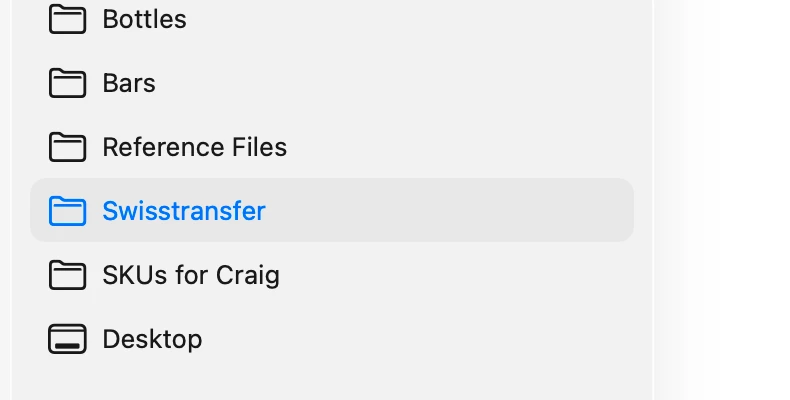
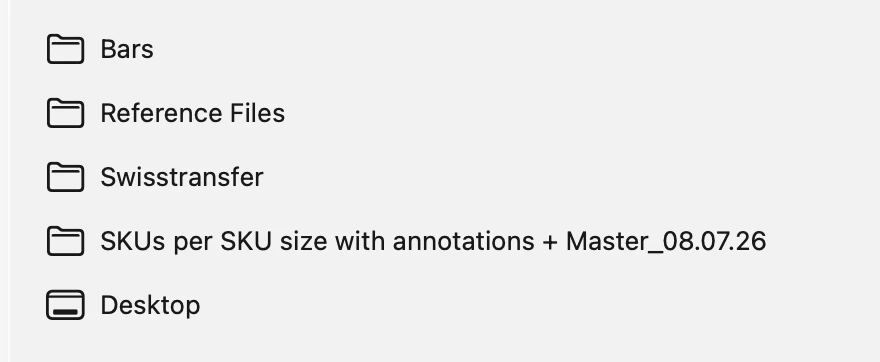
I’ve always had the glitch where if I change the name of a folder - if it's already a shortcut in my Mac OS Finder window it doesn’t change. It keeps the old folder name. Weirdly I just did that today and rather than drag the folder out and then drag it back in again, to get it to update, I just left it. Then I noticed this weird thing happening. When I’m in Illustrator and hit save, the folder name has the new updated name. But then when I leave illustrator and look at my Finder window the folder has the old name. I took screenshots of both (the old name had ‘Craig’ in it). Whats goings on here then? Why is it different? 
 

    Correct answer Abhishek Rao

    Hi ​@richardesignerUK,


    Thanks for reaching out. As the expert mentioned, this does appear more likely to be a macOS Finder glitch than an Illustrator issue, especially since Illustrator is showing the updated folder name correctly.

    Could you please check whether the behavior still persists after restarting your Mac? If it does, try relaunching Finder by holding Option, right clicking the Finder icon in the Dock, and choosing Relaunch. 

    Also, could you please confirm your macOS version and Illustrator version? 


    Looking forward to hearing your observations.

    Abhishek

    3 replies

    Inspiring
    July 9, 2026

    Force quit solved this issue

    Abhishek Rao
    Community Manager
    Abhishek RaoCommunity ManagerCorrect answer
    Community Manager
    July 8, 2026

    Hi ​@richardesignerUK,


    Thanks for reaching out. As the expert mentioned, this does appear more likely to be a macOS Finder glitch than an Illustrator issue, especially since Illustrator is showing the updated folder name correctly.

    Could you please check whether the behavior still persists after restarting your Mac? If it does, try relaunching Finder by holding Option, right clicking the Finder icon in the Dock, and choosing Relaunch. 

    Also, could you please confirm your macOS version and Illustrator version? 


    Looking forward to hearing your observations.

    Abhishek

    Inspiring
    July 9, 2026

    I restarted Finder and the folder name changed to be the correct name. I wonder if this is worthing to do with my other problem with greyed out PSD files. If I amend a PSD and save it as a new file (like a Version 2) when I go back into Illustrator and Place it the file name is greyed out and can’t be clicked and placed in illustrator. Very annoying. This happens every day on a regular basis - and it's been doing it for years now. Even after updating to a new M4 Mac Mini. Sometimes even if I dont place the new file and come back to it hours later it's still greyed out. I also get this delay when moving files from one folder to another in Finder - like spinning beachball for 30 secs whilst it moves a 300k file. I guess there is a problem with cataloguing or something on the Mac OS. I have all he latest Mac OS and Illustrator updates. Infact I just went to place a PSD now in illustrator and saw this. I amended that file yesterday 😂

    Dave Creamer of IDEAS
    Community Expert
    Community Expert
    July 8, 2026

    Technically, the Finder glitch would be a Mac OS glitch too. 

    David Creamer: Community Expert (ACI and ACE 1995-2023)