
Participant
March 11, 2020
Question

Finding Angles on an Arch

  • March 11, 2020
  • 5 replies
  • 419 views

Hey Everyone,


I do a lot of work on control knobs and I was wondering if there was a way for me to find out specific angles on an arch as you see in the picture attached. This one was created by my teammate in CAD using some type of 'unrolling' plugin.


Is there a way If I say have the arch already and know where 0° and 360° is on that arch that I can find all the rest of these specific angles? How do I go about finding exactly where 32.73°, 65.19° etc, etc is on this particular arch? 
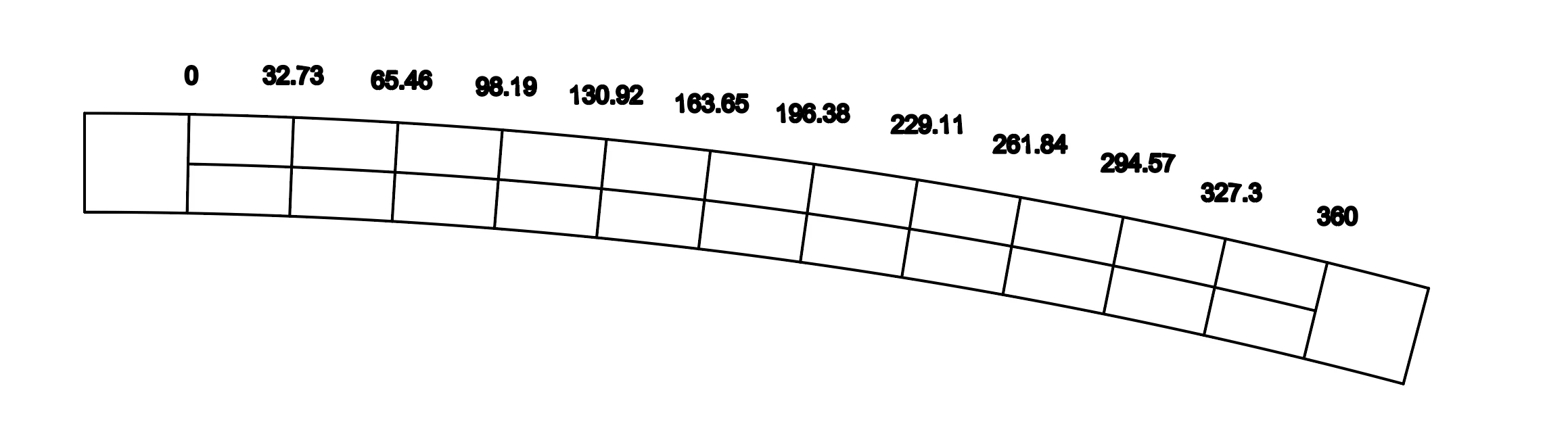


Is there a tool in illustrator that would be helpful? Maybe a plugin I could purchase?


Any help would be much appreciated!


Thanks!

    This topic has been closed for replies.

    5 replies

    Jacob Bugge
    Community Expert
    Community Expert
    March 11, 2020

    ShanoMic,


    As you can see, there are often more ways to do things.


    By the way you can also use the  make the number follow the arc, either bent along it using the Path Type Tool (on a copy of the top arc path with a suitable Baseline shift) or with each number remaining straight by rotating copies (to be edited) round the centre of the arc (which you then need to know).


    Hi Hans-Jürgen.

    pixxxelschubser
    Community Expert
    Community Expert
    March 11, 2020

    Hi @ShanoMic;

    • create three circles (with or without effect - I did use Path Offset effect for the two additional strokes)
    • create a line from middle point of your circle and rotate copies (with or without effect - I did use Transform effect)

    result


    step 1


    step 2


    pixxxelschubser
    Community Expert
    Community Expert
    March 11, 2020

    Hi Jacob,

    now I understand.

    😄

    Jacob Bugge
    Community Expert
    Community Expert
    March 11, 2020

    ShanoMic,


    For this 1/11 division, you can:


    A) Create a normal horizontal Blend of vertical paths with 10 Steps Aligned to Path, then ShiftClick the arc path to also select that, then Replace Spine and Expand; the blend paths will cross the arc in the right spots;


    Or, provided there are Anchor Points at 0° and 360° but none in between:


    B) Install and use the free Divide (length) script below kindly shared by 佐藤浩之 (Satō Hiroyuki), setting the division number to 11; the new Anchor Points will be in the right spots.


    http://shspage.com/aijs/en/


    pixxxelschubser
    Community Expert
    Community Expert
    March 11, 2020

    Sorry,

    but the the angles in your drawing are not plausible.


    Please explain a bit more in detail and with additional drawings.