Participant
Dec 23, 2024 5:21 PM UTC
Question

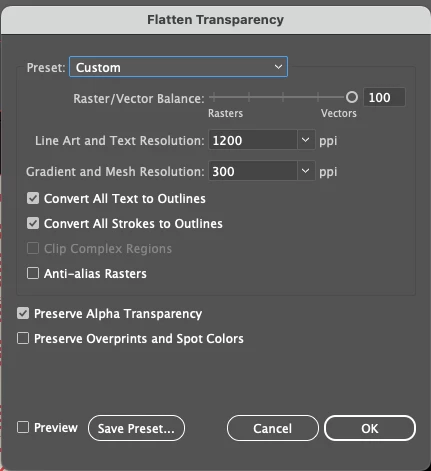
Flatten Transparency for KDP Book Cover

I am creating my first book cover for a client and am having a hard time exporting it as a PDF for Amazon.  KDP. I flattened the transparency first and then exported with the preset [PDF/X-3:2002], but as you can see that looks terrible.

Thanks for any help or advice!

 

This topic is closed to new replies. Start a new post to keep the conversation going.

3 replies

Monika Gause
Community Expert
Community Expert
Dec 23, 2024 7:04 PM UTC

This is the result of "stitching"

THere are pixels all over the place anyway. So what you could do is select all but the text elements, group it and then apply Effect > Rasterize with sufficient resolution and then try again.


Edit: thinking about it: you need to expand appearance of tht text elemnt, so you get that drop shapow as a pixel element. It needs to be grouped with the background. Then apply the Rasterize effect.

Translate
Participant
Dec 23, 2024 9:08 PM UTC

That did the trick! Thank you SO much. Now I'll be able to deliver to my client before Christmas as promised. 

Translate
Lindsay
Monika Gause
Community Expert
Community Expert
Dec 23, 2024 10:29 PM UTC

I'm very glad you could solve it.

Happy Holidays!

Translate