Participant
May 5, 2025
Answered

Font appears larger in Illustrator after Mac update from Monterey to Sequioa

  • May 5, 2025
  • 2 replies
  • 736 views

I have a text heavy Illustrator file with lots of text boxes.

I just updated from the Mac OS from Monterey to Sequioa and when opening the file the font appears larger. 

The font I am using is an apple font Maku. 


I have tried different versions of Illustrator (28.7, 24, 25), it doesnt make a difference.

I have tried disabling "Enable Missing Glyph Protection", also didnt work

I have tried deleting and reinstalling the font, didnt work


Any suggestions please!



Correct answer Brad @ Roaring Mouse

So you think trying Maku from Adobe Fonts coud be worth a try?

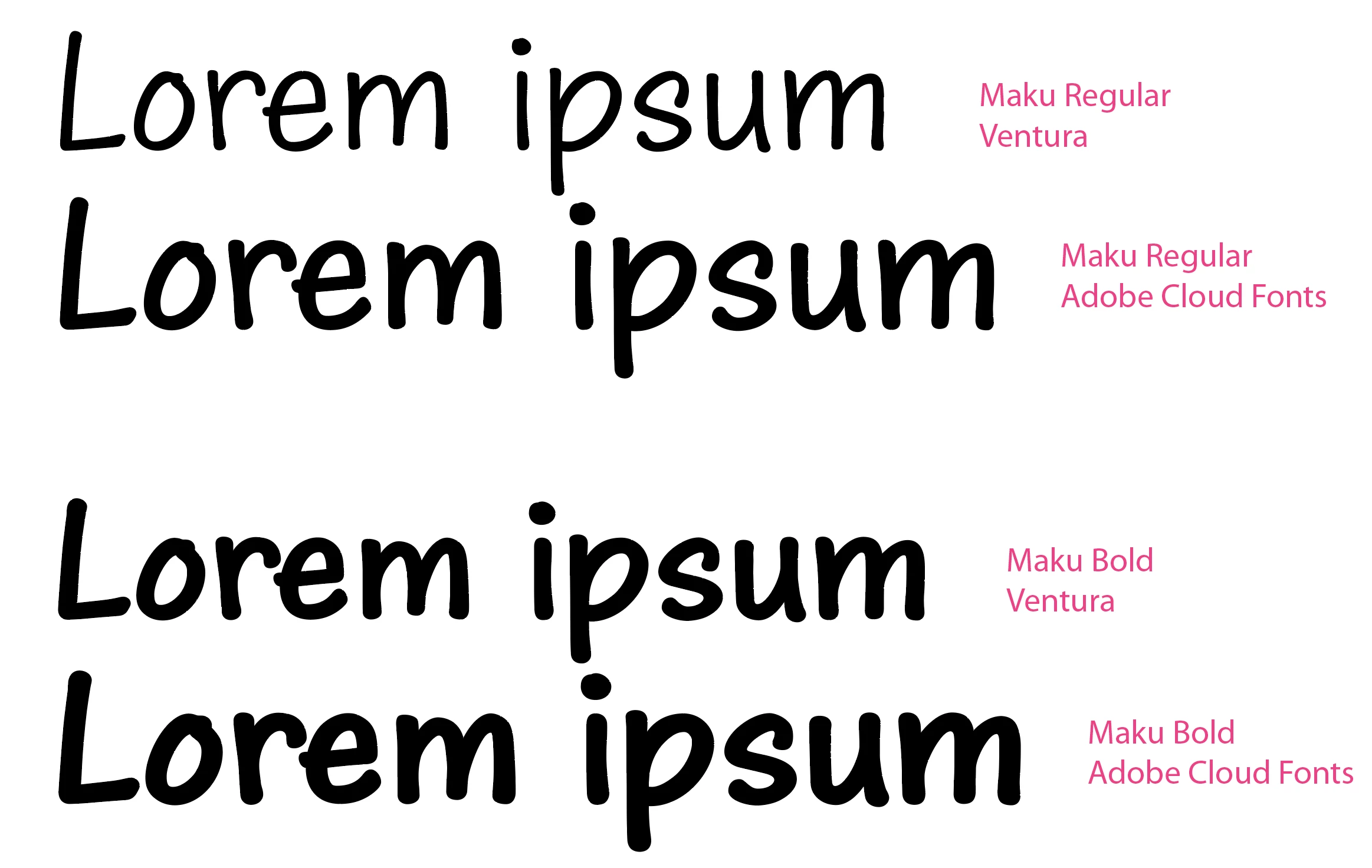
In the screen grab compare both were showing as "Regular" and are the same size.


What I saw was that the Maku Regular in Adobe Fonts is much bolder than the Regular in the OS (I'm looking at Ventura right now), so no, I would probably not go there.. What you need to make sure is that you haven't loaded the versions from Adobe at the same time, which might be interfering. (e.g. if you have Auto Activate selected in Preferences > File Handling, it might be loading the Adobe Fonts version without you realizing it.)

What I don't know is if they also changed the version in Sequoia OS. If so, you might be out of luck.

2 replies

Brad @ Roaring Mouse
Community Expert
Community Expert
May 5, 2025

Looking at the website of the font designer, there was a major redesign of Maku with the recent version, but nothing there says there was a change in the outlines' size.

When you say it appears larger, does it reflow the text? can you show a scrren grab of the before and after?

Participant
May 5, 2025

Here is the screen grab comparison


Brad @ Roaring Mouse
Community Expert
Community Expert
May 5, 2025

Interesting.

Your Bold font appears to be the same, but the font that was Regular in the previous one seems to have been changed to a different weight (it's also ever so slightly larger).

Did you happen to load Maku from Adobe Fonts at the same time? I know there's more weights there than what's in the OS (which should just ne regular and Bold) and you might be getting a conflict. I don't have a Sequoia install so I can't compare the actual OS font files.

What does it say in Illustrator's Type > Find/Replcae dialog?

Monika Gause
Community Expert
Community Expert
May 5, 2025

Can it be ruled out that the font itself has been changed?


Since it is a system font.

Participant
May 5, 2025

Ive managed to get a Font code. 

I have another Mac book that is on Ventura OS and the font appears in the correct size on the file.

If look up the font codes they are different:

  • Maku Regular 14.0d7e8       Ventura OS - Font size appears as it should in Illustrator
  • Maku Regular 20.0d1e2         Sequioa OS (newly updated OS) - Maku code has changed and is appearing too large in Ilustrator.

When you try and open the Illustrator *.ai file in photoshop it opens with the fonts the correct size (but you cant edit it in photoshop)

Monika Gause
Community Expert
Community Expert
May 5, 2025

Photoshop opens the PDF part of the file, which has the orginal font embedded.


https://youtu.be/IpDh8Y7q8yE