


Participant
August 13, 2026
Question

Font different from preview on Adobe Font

  • August 13, 2026
  • 14 replies
  • 86 views

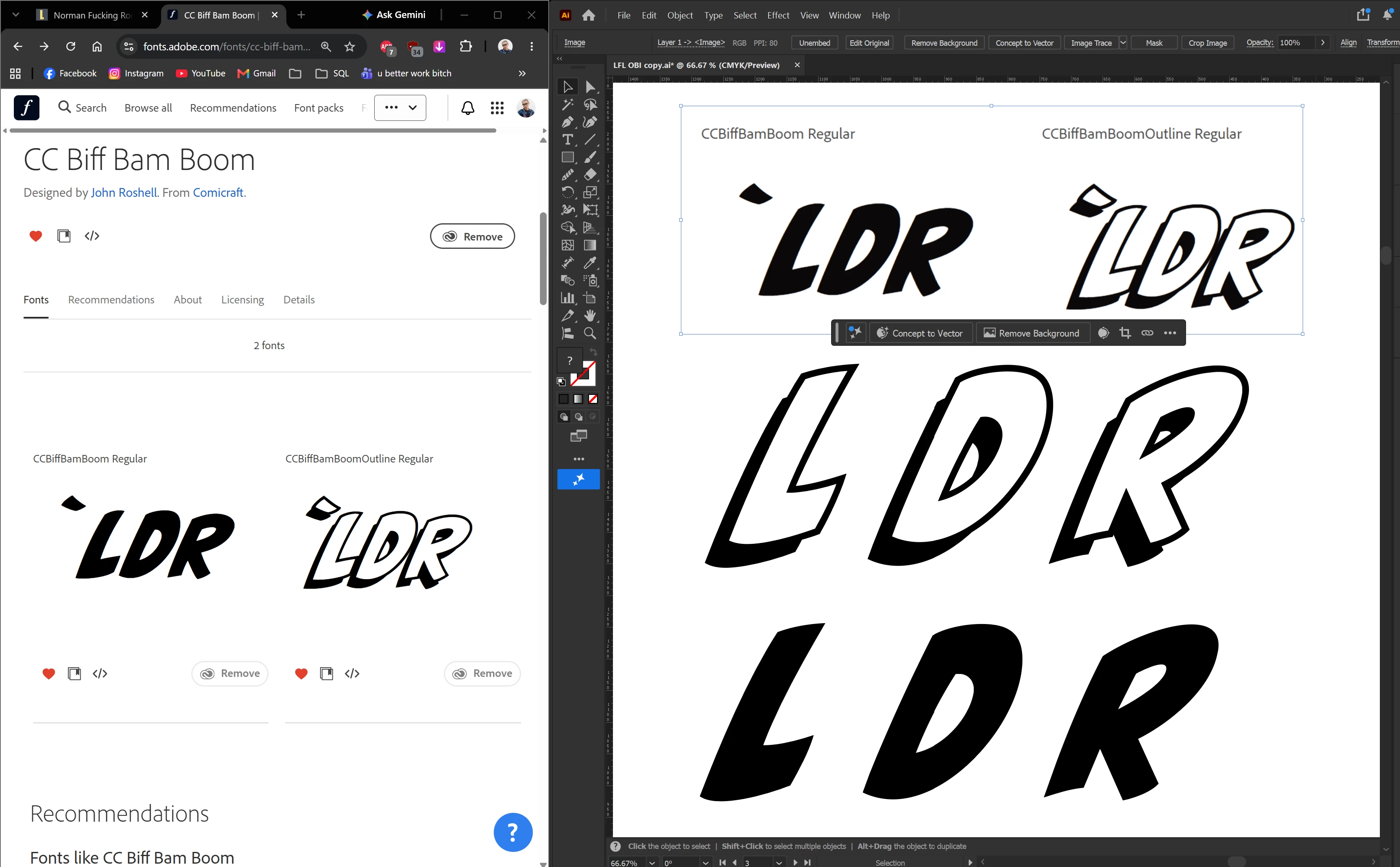
I added a font on Adobe Font, called “CC Biff Bam Boom”, when I tried it in Illustrator, it looks slightly different, some letters even way to different, doesn’t look similar to the preview on adobe font, for instance, the letter R in the attached the screenshot here, I put the screenshot with the text on the Illustrator for comparison, can someone help me?  


    14 replies

    Ton Frederiks
    Community Expert
    Community Expert
    September 14, 2026

    @Bobby Henderson According to the foundry website https://www.comicbookfonts.com/Biff-Bam-Boom-font-p/fx121i.htm , it has Two weights with alternate uppercase alphabets
    (Solid and Outline) and automatic double-letter ligatures and 18 bonus Chinese sound effect characters.

    Community Expert
    September 14, 2026

    At first glance I thought the characters were Japanese, but oh well. The alternate uppercase alphabet glyphs are accessed simply by typing lowercase characters. I’ve seen a number of other all caps fonts use the same approach. It gets a little more confusing when they add alternate glyphs under both the caps and lowercase registers.

    Ton Frederiks
    Community Expert
    Community Expert
    September 14, 2026

    They use the ligatures function to get the alternate glyph once you type the same charachter twice.

    Ton Frederiks
    Community Expert
    Community Expert
    September 11, 2026

    @Flawless_strengthd128 I see now that it is built into the font. You can turn it on and off using the Standard Ligatures option in the OpenType panel. I do not think it is a good use of the Ligatures option, there is no merging of characters involved. I would think that the Contextual Alternates would have been more suited for this behaviour. 

    Participant
    August 14, 2026

    I’ve seen this happen when the font preview and the actual application are using different font weights, versions, or rendering settings. If the font looks correct on Adobe Fonts but changes after activation, I’d first check whether the exact font family and weight shown in the preview are the ones installed and selected in the design application.

    It’s also worth checking for an older local copy of the same font. Duplicate versions can sometimes cause applications to load a different file than expected. Removing the duplicate and restarting the application can help.

    If the difference only appears on screen and not in exported files, the issue may be related to font rendering or the application itself rather than the font. Testing the same font in another Adobe application can help narrow that down.

    For a quick break between design troubleshooting, papasbakeria.io can be a fun distraction.

    creative explorer
    Community Expert
    Community Expert
    August 14, 2026

    @Clever_Delight400d I literally just downloaded the font for the first time ever, and of course, deactivated as well, only for test purposes for ​@Flawless_strengthd128. There are only two fonts as shown in both my screenshot and the original post. This one did stump me! 

    m
    Ton Frederiks
    Community Expert
    Community Expert
    August 13, 2026

    @Flawless_strengthd128 There seem to be multiple versions of this font. Can you check if you do not have another version installed? You can remove the font from your Adobe fonts and check if it is still available in Illustrator after that.

    Participant
    August 14, 2026

    I already checked and this is the first time I installed this font, I tried remove and re-add again, restart illustrator, but somehow it’s still so different

    Ton Frederiks
    Community Expert
    Community Expert
    August 14, 2026

    I hope someone comes up with a better suggestion.I cannot reproduce the problem.
