Participant
Sep 22, 2025 3:10 AM UTC
Answered

font Issue After Upgrading to macOS Tahoe 26.0

After Upgrading to macOS Tahoe 26.0 and Illustrator29.8.1

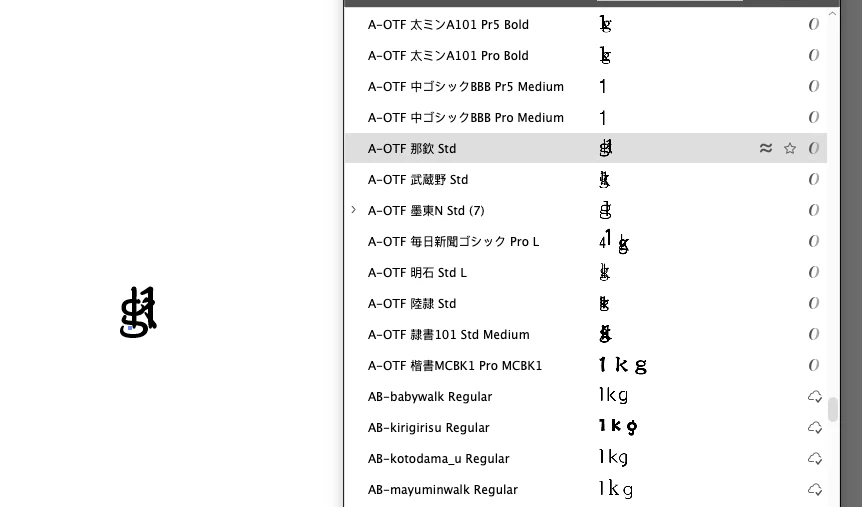
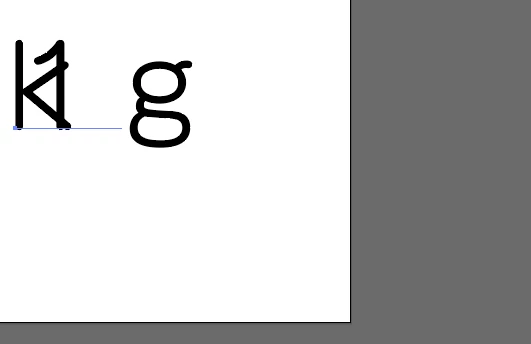
some of japanese font arrangement got wrong,

I had tested in photoshop, it seen not have any problem.

only happen in Illustrator, i tryed uninstall, but unless 
silk-m
silk-mCorrect answer
Community Expert
Oct 1, 2025 8:33 AM UTC

Seems to be fixed in 29.8.2 #3.

For the Beta version, this has been fixed in 30.0 #91.
If you did not initialize your preferences, please recreate the Fonts.lst file.


Best Regards

--Susumu Iwasaki

8 replies

silk-m
Community Expert
silk-mCommunity ExpertCorrect answer
Community Expert
Oct 1, 2025 8:33 AM UTC

Seems to be fixed in 29.8.2 #3.

For the Beta version, this has been fixed in 30.0 #91.
If you did not initialize your preferences, please recreate the Fonts.lst file.


Best Regards

Translate
--Susumu Iwasaki
Rene Andritsch
Community Expert
Community Expert
Sep 23, 2025 8:39 AM UTC

@marketing_2400 It is always a bit risky to immediately upgrade the operating system immediately once it is publicly available. On the system requirements page for Illustrator there isn’t even macOS 15 mentionened, yet. https://helpx.adobe.com/illustrator/system-requirements.html#ai-on-the-desktop

I usually wait almost half a year before upgrading my system, then most of the early issues have disappeared. Unfortunately it is quite cumbersome to downgrade macOS.

Log a bug here on the bug section of the forum and additionally also on Uservoice: https://illustrator.uservoice.com/forums/939477-illustrator-desktop-beta-bugs

I will try to involve someone from the Ai-team.

Translate
Anubhav M
Community Manager
Community Manager
Sep 25, 2025 4:28 PM UTC

Hello @marketing_2400,

I'm sorry to hear about your experience. Could you confirm the exact name of the font(s) you're having trouble with along with a small screen recording of the problem, so I can check this with the team?

Looking forward to hearing from you.
Anubhav

Translate
Participant
Sep 26, 2025 3:45 AM UTC

Hi Anubhav,

Here is the video
https://drive.google.com/file/d/11kq3voPsHmIHNmL8JVBG1syJRzNSESjx/view?usp=sharing 
Im using MacOS-26.0 (25A354) & illustrator is 29.8.1

All the fonts is Japanese font, I checked in photoshop(26.10), is ok to be use.

thanks


Translate