
Participant
February 7, 2024
Question

Font/Logo Modification

  • February 7, 2024
  • 1 reply
  • 546 views

Hello! 

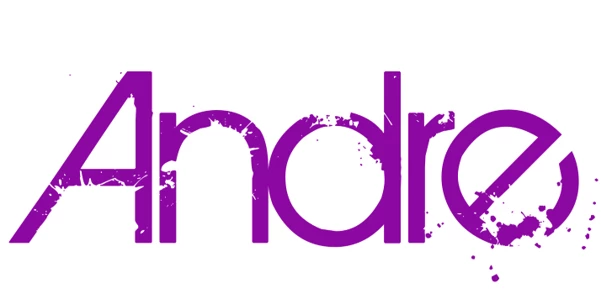
I've posted here before with no luck but wanna I try again.. I'm a podcast host looking to update my show's look with a new logo. After using the same logo for 5 years, I'm ready for a refresh and I've found a font that I really like. The problem is there is a splat/paint like effect (not sure what this is called) embeded in the design of the font. A commenter in my previous post thought this was a modified version of ITC Avant Garde but I'm not sure. Is there a possible way to fix or remove the effect from the font or find this same font without the effect? 
 

This topic has been closed for replies.

1 reply

Community Expert
February 7, 2024

The font definitely looks like a stylized imitation of Avant Garde Gothic. The slanted "A" is similar. The "e" looks like it was merely rotated. Versions of Avant Garde that have an expanded character set have alternate "e" characters that look rotated, but the bottom loop doesn't wrap around as far as the "e" in your example.


There are ways how the splats and gaps in those letter forms can be removed. But it will take a good amount of path editing. Since it's a "geometric sans" typeface it shouldn't be hard at all to re-build new shapes over the top of the original letters. Just lock the original lettering on one layer. Create another layer above it and create rectangles and circles that match up with the letter shapes. Several different methods can be used to create the final letter forms.

AndreTVAuthor
Participant
February 8, 2024

Thank you so much! I'm definitely going to be looking at a tutorial on how to do this. If I can't find anything, I'll be back to get your advice.

Community Expert
February 8, 2024

I'll be here.