
Steven_O_
Participant
April 9, 2018
Answered

Font Menu Jumping Back To First Font Issue!

  • April 9, 2018
  • 2 replies
  • 763 views

Hello all,

With the most recent update, my font menu is jumping back to the first font when ever I try exploring new fonts.

EXAMPLE: Scroll through fonts to Futura. Figure out I need the other Futura Family right below it. Select menu again, and have to start all the way back at "aaaa typeface"

This problem is especially frustrating when searching for different fonts when doing initial design work and remember "it started with a K..." and back to the first font!

IS THERE ANY FIX FOR THIS? It's beyond frustrating!!!

Thanks!
    This topic has been closed for replies.
    Correct answer Doug A Roberts

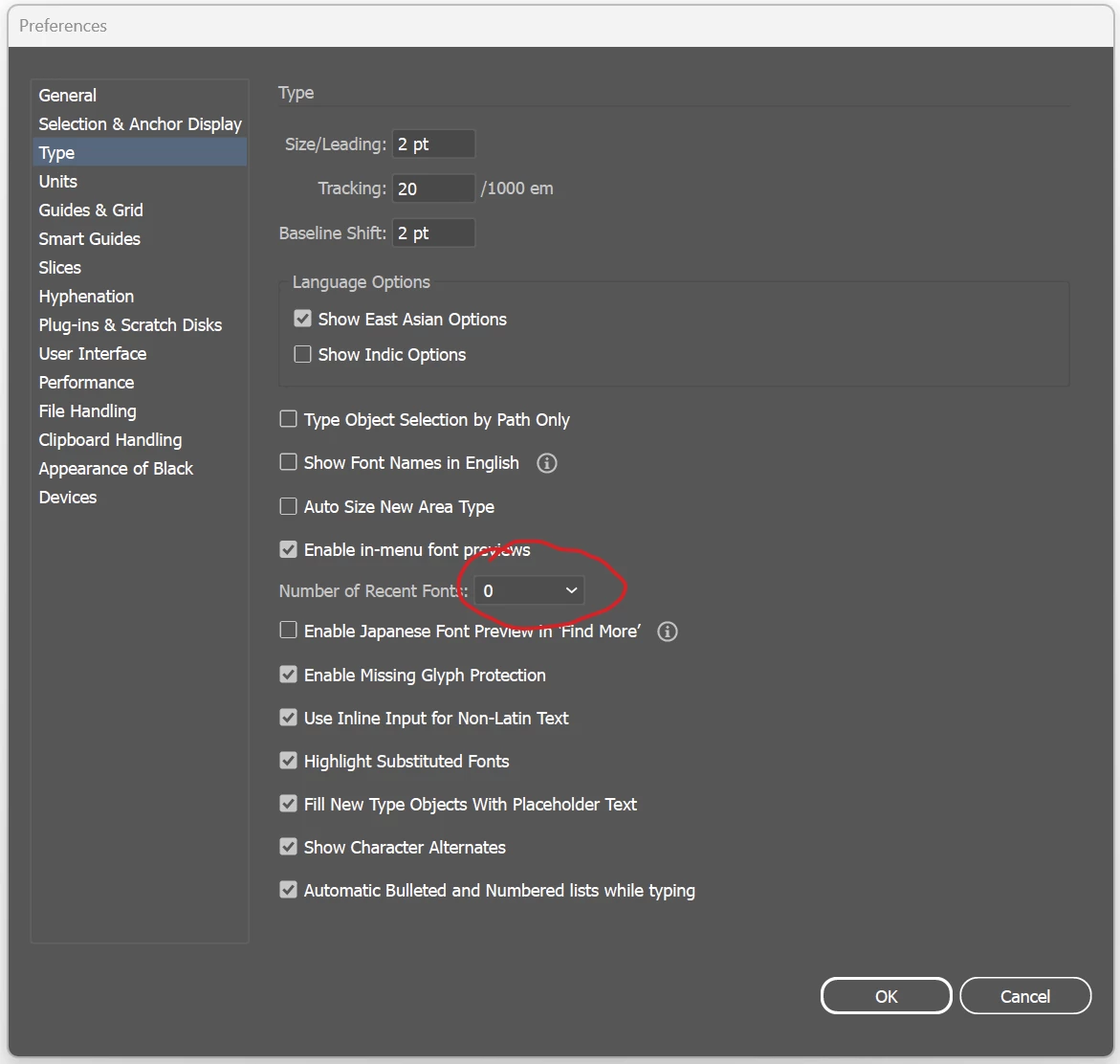
    Try removing recent fonts in Preferences. With those disabled, the current font should be selected when you open the menu:


    2 replies

    Participating Frequently
    March 5, 2024

    Was there ever a fix? This has been driving me crazy for years. It doesn't make any sense. The active font should be what selected in the menu. 

    Anshul_Saini
    Community Manager
    Community Manager
    March 7, 2024

    Hi @bonnseye,


    I understand your frustration with this issue. Unfortunately, there isn't a direct fix for the font menu jumping back to the first font. However, there are a couple of workarounds you can try to make the font selection process smoother.


    One option is to use the search function in the font menu. You can simply type the name of the font you're looking for, and it will filter the fonts accordingly, saving you from scrolling through the entire list.


    Another option is to type the first letter of the font you're looking for directly into the font menu. For example, if you remember that the font you want starts with the letter "K," you can type "K" in the font menu, and it will jump to the first font that starts with "K."


    I hope these suggestions help make the font selection process less frustrating for you! If you have any other questions or need further assistance, feel free to ask.


    Best,

    Anshul Saini

    Participating Frequently
    March 7, 2024

    Thanks for the suggestion, Anshul, but the problem is, designers often don't know which font they want. When designing a logo, for example, we typically need to look at several options side by side. The way the menu is convigured by default, it's not easy to puruse the options in a visual way. It makes you scroll through alphabetically rather than making the currently-selected font active in the menu. This is perfectly logical if you are a programer type, but it's not logical for a designer. I don't think Adobe tested this with designers, when they changed it several years ago. Thanks again for the suggestion though. 

    barbara_a7746676
    Community Expert
    Community Expert
    April 9, 2018

    You are not alone. Many people are frustrated by this, myself included. Unfortunately, no fix.

    You can fill out a request form. Feature Request/Bug Report Form