

GoodwillAZ_Gene
Participant
March 15, 2017
Answered

Font Style Dropdown Not Displaying All Styles

  • March 15, 2017
  • 1 reply
  • 905 views

Greetings,

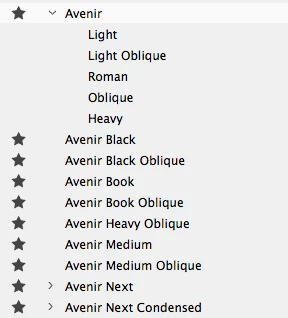
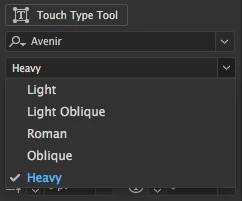
I have an issue that has recently sprung up. A font I use has multiple styles, as of late they have now been broken up into their own fonts. I have attached an example of my issue. I use Avenir, and all styles for that were under Avenir, but now I have 8 different fonts for Avenir. Avenir Black down to Avenir Medium Oblique in the attached screen shot, should all be under Avenir. Avenir Next, and Avenir Next Condensed are still working as normal.
    This topic has been closed for replies.
    Correct answer GoodwillAZ_Gene

    I am using a Mac, turns out to have been some sort of technical issue. I deleted my preferences for Illustrator, and restarted it. That seemed to have cleared up my issue. Thank you for your quick reply!

    This linked showed where/how to reset preferences.

    How to set preferences in Illustrator

    1 reply

    Mike_Gondek10189183
    Community Expert
    Community Expert
    March 15, 2017

    In the fonts is encoded a family name that they belong to, and that ti who Illustrator and other programs knwo who to group them. So the questions is did you load more fonts than you had in the past and they are not in same family name, or is there some technical issue causing this.

    For example if he fonts below were loaded they would fall into 3 different groups, as I circled in red, because that si who they were coded.

    Most likely you just loaded some fonts you did not have loaded before, but am not ruling out hat you may have a technical issue. What platform are you on, we can try resetting your font cache. Let us know if you an programs installed that affect you system or Illustrator. For example Acast antivirurs causes and issue of adding .00000 to a ll you numbers.

    GoodwillAZ_Gene
    GoodwillAZ_GeneAuthorCorrect answer
    Participant
    March 16, 2017

    I am using a Mac, turns out to have been some sort of technical issue. I deleted my preferences for Illustrator, and restarted it. That seemed to have cleared up my issue. Thank you for your quick reply!

    This linked showed where/how to reset preferences.

    How to set preferences in Illustrator

    Mike_Gondek10189183
    Community Expert
    Community Expert
    March 16, 2017

    For my part you are welcome.