
Participant
March 13, 2026
Question

Fonts Keep Disappearing

  • March 13, 2026
  • 1 reply
  • 14 views

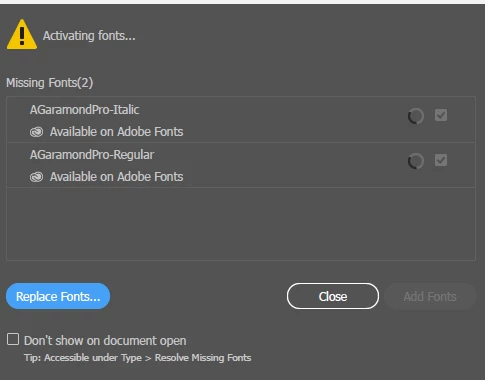
I am using the same fonts all the time - quick edits to business cards etc. Font errors keep popping up when I open files I use all the time - for fonts that are available on Adobe Fonts. They will be removed from my system (even if I used them as recently as the day before) and just keep cycling in the Add Fonts panel. 

Even going on the Adobe Fonts site, clicking remove, and re adding / shut down / restart - it will just keep cycling. 
 

    1 reply

    Anubhav M
    Community Manager
    Community Manager
    March 13, 2026

    Hello @Matthew-Wolff


    I'm sorry to hear about your experience. Would you mind trying the suggestions shared in this help article (https://adobe.ly/4shihtO) and let us know if they help?


    Looking forward to hearing from you.

    Anubhav

    Participant
    March 19, 2026


    Not sure if this is the solution. Example - all day yesterday my Adobe Garamond Pro font cycled not loading, but when I open today it fixed itself/re downloaded after 10 seconds (like normal). 

    Above screenshot is the error I get when I try following your steps to clear the font cache. 

    Community Expert
    March 19, 2026

    It’s usually best to sign out of the Creative Cloud account using the desktop CC app and then reboot the computer before deleting the font data cache file. Sign back into the CC account afterward and make sure account sync is working properly.