
Participant
June 23, 2023
Answered

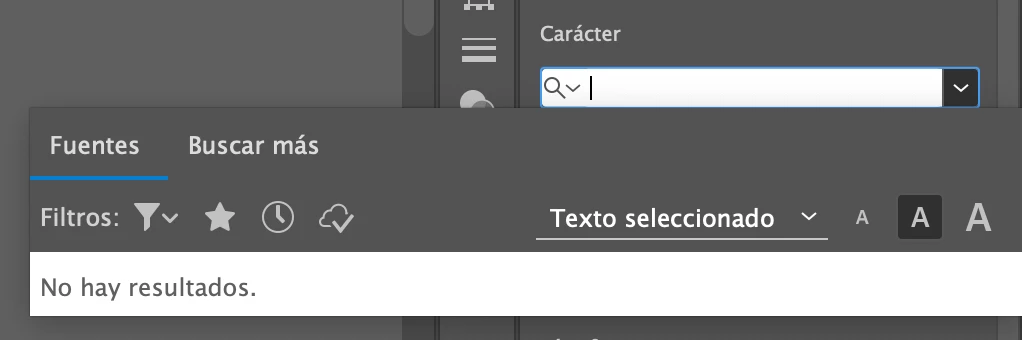
Fonts panel doesn't display system/user fonts

  • June 23, 2023
  • 2 replies
  • 468 views

I have over 500 fonts installed both system and users, they are available in any other CC app except Illustrator. My Ai font panel won't show any of them even when installed properly, so I'm not allowed to interact with my texts. I tried unistalling and reinstalling, that solved the problem for a couple of hours and something triggered the error again. I have illustrators latest version (2023) and MacOsMonterey12.5. Anyone have a solution to my problem pls!!? :))
This topic has been closed for replies.
Correct answer Monika Gause

nop, OPT, I read Type 1 are no longer compatible with Adobe


That is the case. I just wanted to make sure you are aware of that.


You might need to do some serious debugging: https://helpx.adobe.com/fonts/kb/troubleshoot-fonts-illustrator-indesign.html


Illustrator is particularly peculiar when fonts are concerned. When fonts are not 150% OK, then Illustrator can get very upset about that and throw a tantrum.

2 replies

Community Expert
June 26, 2023

Do you have a font manager application running on your computer? Are there other graphics applications not made by Adobe running at the same time as Illustrator?

Participant
June 26, 2023

The only font manager I have is fonts catalogue and no other graphics applications are running all my apps are Adobe licensed

Monika Gause
Community Expert
Community Expert
June 23, 2023

When was the last time you rebooted the computer?


Participant
June 26, 2023

I rebooted trying to fix it but it didn't work. Do you know what's going on?

Monika Gause
Community Expert
Community Expert
June 26, 2023

Those are not PostScript Type 1 fonts, no?