
andreaf93771760
Participant
July 8, 2019
Question

Frame Edge not Aligned to Object

  • July 8, 2019
  • 3 replies
  • 1281 views

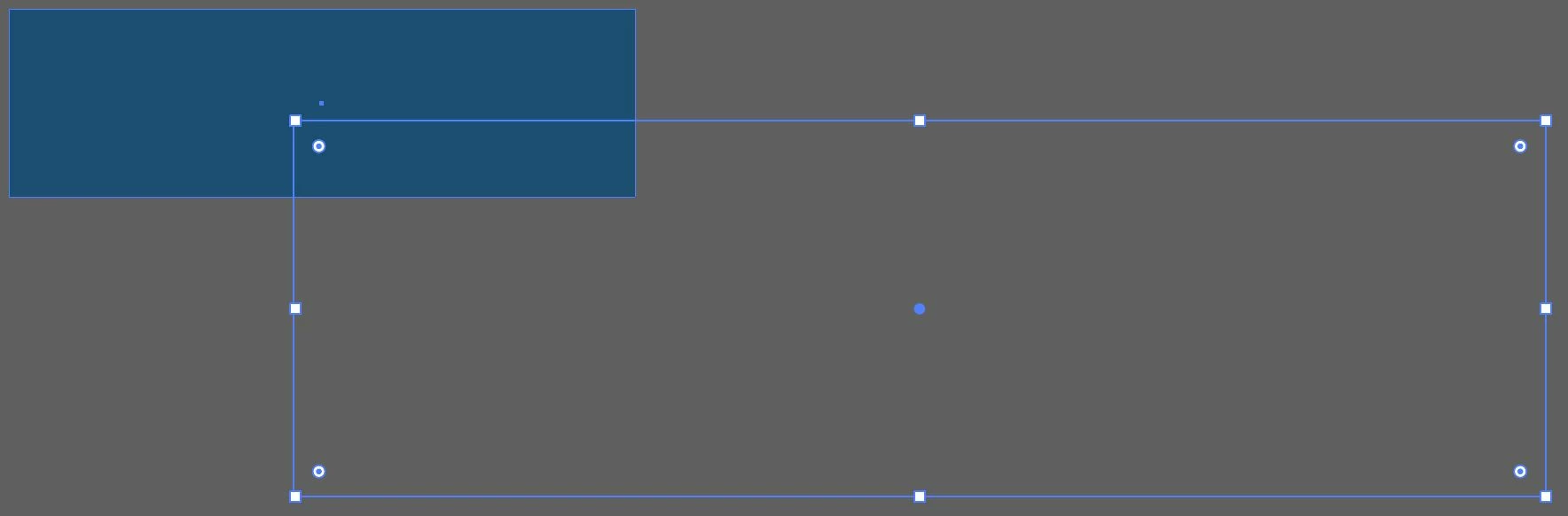
Can't figure out why my basic shapes have the frame edge / handles clear off to the right, instead of around the perimeter of the shape. Every time I draw a new shape, it does the same thing. The objects are not grouped to anything. Screenshot below. Help!
    This topic has been closed for replies.

    3 replies

    Monika Gause
    Community Expert
    Community Expert
    July 8, 2019

    There have been real issues with the bounding box and some are caused by effects (as already menitioned)

    See:

    Bounding box not aligned with object

    Bounding box outside of shape

    Bounding box in illustrator is displaced on external screen

    Ton Frederiks
    Community Expert
    Community Expert
    July 8, 2019

    Can you check if there is a Transform effect applied to te object or the layer?

    See the Appearance panel.

    Michael Bullo
    Community Expert
    Community Expert
    July 8, 2019

    Have you tried resetting the Illustrator preferences?

    How to set preferences in Illustrator

    "Press and hold Alt+Control+Shift (Windows) or Option+Command+Shift (macOS) as you start Illustrator. You are prompted to delete the current settings. The new preferences files are created the next time you start Illustrator."