


Freeform Gradient creates shades darker than any colours used to generate the gradient!
Hi
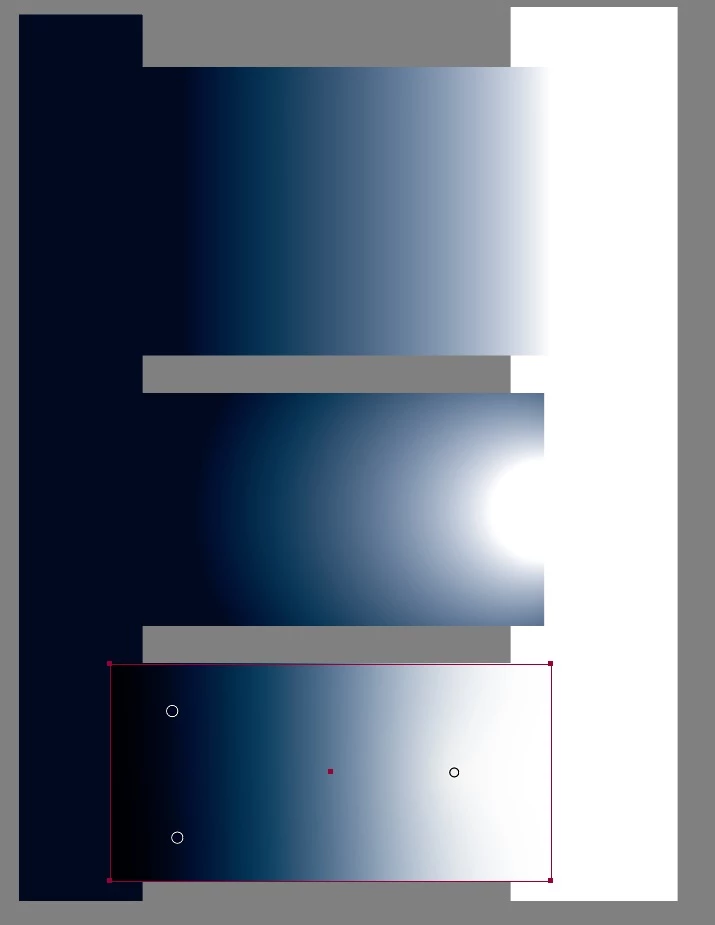
I am using shapes and gradients to create a design. I have noticed that when using the Freeform Gradient tool it creates areas close to the edge of the shape darker than any swatch/colour used to generate the gradient. This makes it very difficult to match colours of two separate objects. The below image illustrates the issue I am experiencing. The top middle box is a linear gradient (dark blue and white) and the edge colours match the corresponding swatches of the vertical boxes underneath. The same can be said for the radial gradient in the center. However, when a freeform gradient is used, the left edge beyond the blue coloured points (which are the same blue as the vertical rectangle) is darker. Why does illustrator ignore the colour range I have given it when using the freeform gradient tool? Interestingly, I am unable to generate the same phenomena regarding areas becoming lighter! Basically, I need to control the range of colour/shade so that I can match edges. The only 'work around' I have come up with is to litter the shape edges with gradient points with the colour I require, but this is tedious and makes any colour changes very time consuming. Any assistance/ideas would be appreciated.
Cheers
 AdChoices