


halodu2de
Participant
June 15, 2018
Answered

Freezing when opening or saving a file

  • June 15, 2018
  • 2 replies
  • 2788 views

I'm really screwed here in terms of deadlines and have been trying to find a solution to this for several days please help me.

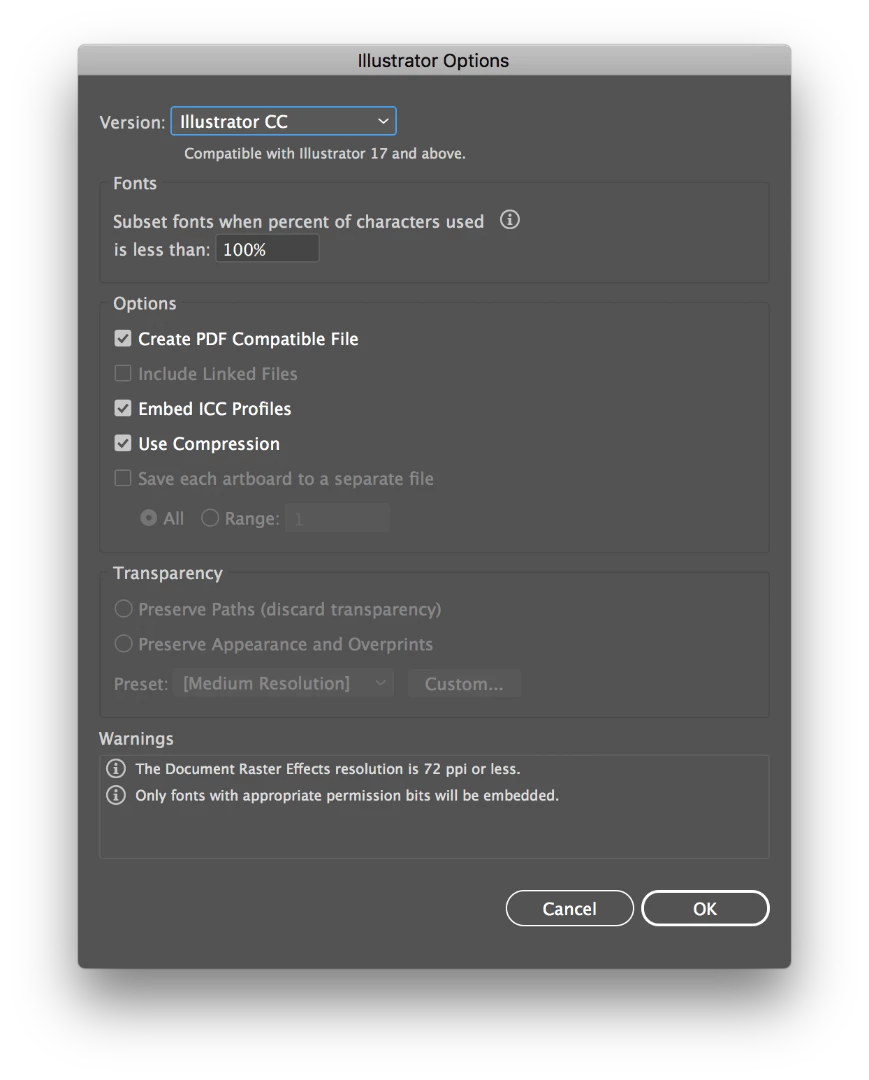
When I open any file, Illustrator freezes. When I save any file or export, it freezes at the "Illustrator options" screen when I hit "Ok".

I'm using the latest version of macOS and Illustrator CC. I have an image attached of where it freezes.

The file I'm trying to save shows up where I chose to save it even though it freezes, but once again I can't even open it to see if it saved because it crashes upon opening files.

I've tried removing preferences, removing and reinstalling illustrator, restarting my computer, clearing caches, turning off login items, all to no avail.

I've been using Illustrator for a long time (years) and this just randomly started happening.

If I make a new user account on my Mac, everything works as normal. But this is not a solution for a professional user who uses Illustrator for hours on end every day.

PLEASE HELP.
    This topic has been closed for replies.
    Correct answer halodu2de

    The one thing I did not see in your list of troubleshooting actions was to delete your OOBE files.

    To do so:

    With InDesign closed launch a Finder Window in column view and click on your home folder. With the Option Key pressed choose Library from the Finder Go Menu. Within the Library folder delete the file at the end of this path: Application Support\Adobe\OOBE\opm.db. 

    After deleting this file you will have to sign in again to your Creative Cloud account.


    I FIXED IT! I was about to try your solution Bill, but beforehand I did a thorough scan off all my apps and used malwarebytes to scan my mac. I removed Adobe CC and all apps completely, used AppCleaner to remove all the files from any apps I didn't need, scanned and removed a couple miners with malwarebytes, and then removed malwarebytes. Everything is working well now. Thank you so much for your help!

    2 replies

    ceyhun_akgun
    Legend
    June 16, 2018

    The reasons for such technical problems can be complicated. Even a simple faulty font can turn our lives into hell.

    I installed different programs on my computer. I do not know which one caused it, but sudden lock-in, collapses have begun to live.

    I cleaned the whole system by formatting. In my working life, I installed and continued the priority software. The problem got out of nowhere.

    Strange, but also installed over the internet software, trojans and so on. I think you can create problems with them.

    Suggested shudder;

    Always have your computer in two parts. In both cases, the system is software. Be the basic and the priority ones. You are fully authorized to access, save and delete the files of either partion.

    You can continue by opening your work from the other part when the problem occurs.

    Graphic Designer Educator / PrePress Consultant
    halodu2de
    halodu2deAuthor
    Participant
    June 18, 2018

    Yeah they are definitely issues that can happen but I've only expected that from using Windows. I've used Windows for 13 years as a power user. I switched to Mac 5 years ago for my primary OS and I haven't had a single problem until now. I develop software, apps, etc for several ecosystems and I know many programming languages, but I cannot figure out what is causing this issue with Illustrator.

    It's strange that it works perfectly (as well as all other applications including Adobe CC apps) except for saving and opening. It's driving me mad.

    Monika Gause
    Community Expert
    Community Expert
    June 15, 2018

    Is a printer connected, set up as the default printer and turned on? If not, attach one.

    Where do you save your files? If on a network, try the harddisk.

    halodu2de
    halodu2deAuthor
    Participant
    June 15, 2018

    Yes I do have a printer set up and everything. I save my files to disk.

    Bill Silbert
    Community Expert
    Community Expert
    June 15, 2018

    Is your Illustrator using any third party plug-ins?

    When you uninstalled and reinstalled did you do it in the following manner?:

    In the app section of your Creative Cloud desktop app click on the “V” next to the app’s (Illustrator) name and choose the “Uninstall” option from the pull-down menu that appears. After you’ve run the uninstall then use the Creative Cloud Cleaner Tool Use the Creative Cloud Cleaner Tool to solve installation problems  . Then reinstall the program through the Desktop app. Before you reinstall, once again trash all preference files to make sure that your install is completely clean. Then launch Illustrator and see if the problem persists.