

Question
Function request : Disable smart guides to some specific object/layer
Hi there,
After using Illustrator for quite some time, I found there has one function I need the most.
Which is to disable smart guides to some specific object/layer.
Smart guides are amazing but I found that they won't work well if I had a crazy vector texture background.
When I try to align to the main object I am working on, it will just try to align to background vector textures. Which is not ideal.
So I have been thinking, could there have a feature, that disables smart guides to some specific object/layer, like we can lock anything that we want?
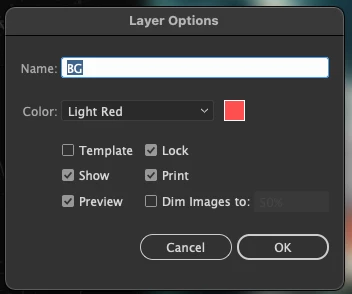
Might be we could add a "disable smart alignment" option here?
Thanks


 AdChoices