
emaryy
Participant
May 14, 2017
Answered

gap between connected paths illustrator

  • May 14, 2017
  • 3 replies
  • 1750 views

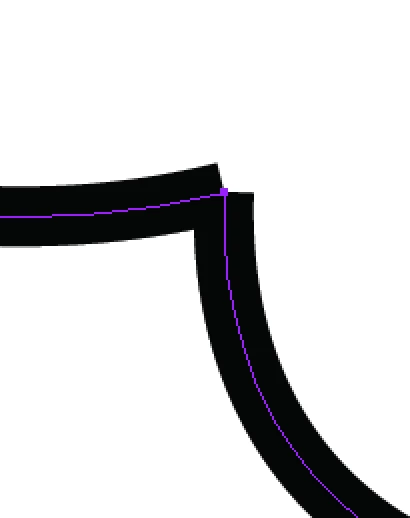
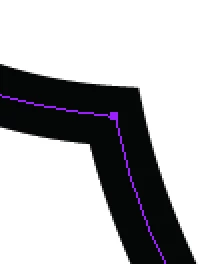
When I enter live paint mode and increase the stroke size of my paths, I notice the larger I go with stroke size, the larger a gap there is between paths that are intersecting but which have a large angle between them. Is there any way to make illustrator have these paths smooth out so there's no large gap, or come to a tapered point? Here's an example of the problem (two separate paths I made intersect) and an example of what I would like it to look like (a corner from one continuous path I drew). Thanks in advance!
This topic has been closed for replies.
Correct answer Ton Frederiks

In Live Paint mode it is difficult (maybe even impossible) to delect both anchor points to join them.

But when you are finished with Live Paint , can choose Object > Live Paint > Expand and select them (the strokes are in a separate group) to join them. You can make it a Live Paint object again after joining.

3 replies

Participating Frequently
December 27, 2023

I am having this same issue, only its when i use the shape builder tool to edit lines i have created with the line tool. The paths are intersecting and some create corners but others create the gap shown above. I cannot figure it out and its driving me nuts! PLEASE HELP 

Monika Gause
Community Expert
Community Expert
December 27, 2023

Is there just one anchor point? Or two?

Participating Frequently
December 27, 2023

Just one

Ton Frederiks
Community Expert
Ton FrederiksCommunity ExpertCorrect answer
Community Expert
May 14, 2017

In Live Paint mode it is difficult (maybe even impossible) to delect both anchor points to join them.

But when you are finished with Live Paint , can choose Object > Live Paint > Expand and select them (the strokes are in a separate group) to join them. You can make it a Live Paint object again after joining.

Monika Gause
Community Expert
Community Expert
May 14, 2017

You cannot connect them "on the fly".

What you can do is select a different cap for the stroke, like round or protruding, but that's it.