Generating connected rounded rectangles
Hi there,
i want to generate a Illustrator file and then work on the result manually. I have alot (hundreds) of strings which i want to be placed in rounded rectangles and then some of them are connected by paths with arrowheads. Let me show you a small example done by hand:
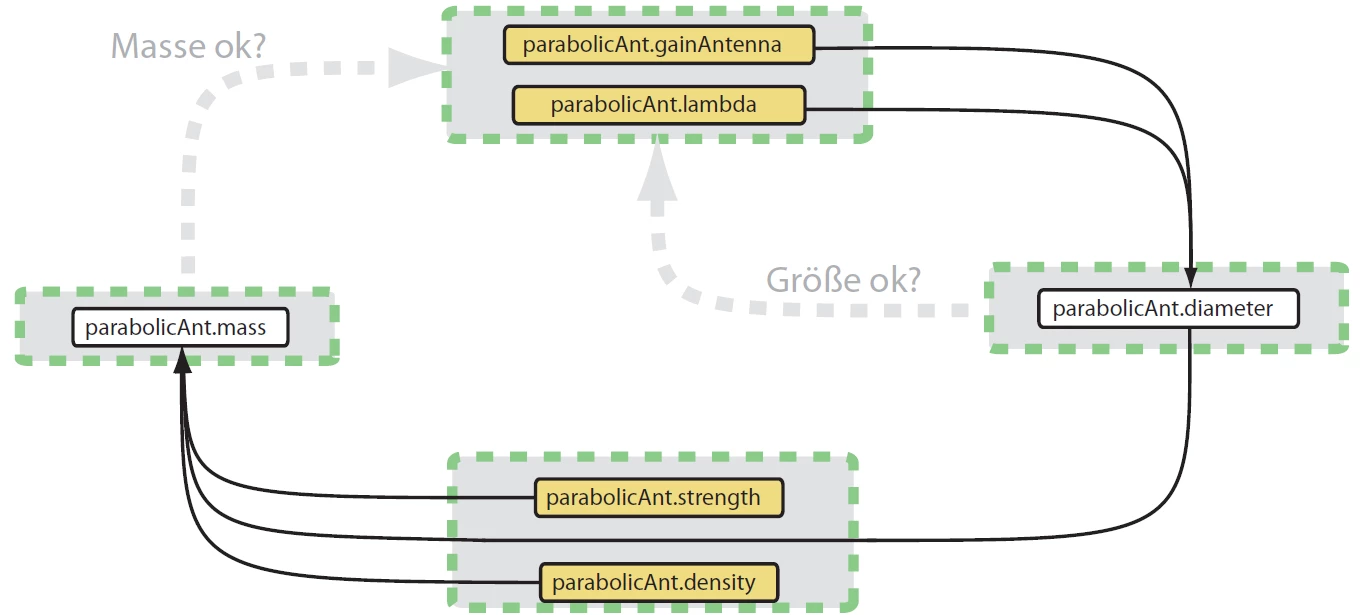
What i already have, is the code to generate the rectangles and the string. What i couldnt find up to now, is a possibility to fix a path to the rectangles. The problem is that i dont know the final position of the rectangle in advance, i have to place it by hand. So the path should move with the rectangle.
Here is what i do up to now:
var docRef = app.activeDocument;
var layer = app.activeDocument.layers.add();
var black = new CMYKColor();
black.black = 100.0;
var white = new CMYKColor();
white.black = 0.0;
var newGroup = docRef.groupItems.add();
newGroup.name = "myGroup";
newGroup.move( docRef, ElementPlacement.PLACEATEND);
var rndRect = newGroup.pathItems.roundedRectangle( 637.5, 87.5, 185.0, 18.0, 3.0,3.0);
rndRect.position = Array(100,70.0);
rndRect.fillColor = white;
rndRect.strokeColor = black;
var pathTextRef = newGroup.textFrames.add();
pathTextRef.contents = "parabolicAnt.carrierFrequency";
pathTextRef.selected = true;
pathTextRef.position = Array(50,72.0);
So, any hints appreciated.
Thanks, Joe
PS. a minor question in this context: How can i center the string in the rounded rectangle?
 AdChoices