
Inspiring
November 8, 2022
Answered

Get list of colors from selection or document swatches

  • November 8, 2022
  • 11 replies
  • 889 views

Hi community, can you help me up with the following?

This is very related to the thread: https://community.adobe.com/t5/illustrator-discussions/turn-document-swatches-into-colored-text/m-p/13321578#M342242

shoutout to @femkeblanco and @pixxxelschubser for your help in the last thread.

Now I am wondering if I can get the same list, but without coloring the text, it will look like this:
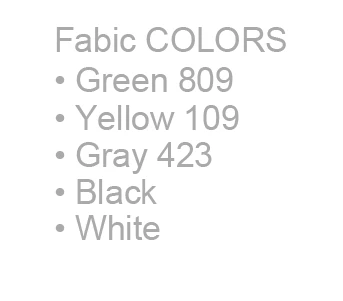
 

it will get the list of colors from swatches (in case it's an image coming from PS already with colors) or from the selection (in case it is a vector), help em to add that "point" in the begining of the text, and... if is not ask for too much, the code would let me change the spacing in teh lines, the font style and color, thank you! Have a nice day.

This topic is closed to new replies. Start a new post to keep the conversation going.
Correct answer femkeblanco

This is a hasty change to the preceding script.  See if it does what you want.

// var orientation = "vertical";  // or "horizontal"
var size = 10;
var space = 5;  // horizontal space between textPaths
var font = "ArialMT";  // font
var w = size * 2, h = size, x = 0, y = h + space;
var doc = app.activeDocument;
var swatches = doc.swatches;
var color = swatches["Black"].color;  // color
var group = doc.groupItems.add();
var rect = doc.pathItems.rectangle(- y + h + space, x, w, h);
var text = doc.textFrames.areaText(rect);
text.contents = "Fabric COLORS";
text.textRange.size = size;
text.textRange.textFont = textFonts[font];
text.textRange.fillColor = color;
while (text.lines[0].characters.length < text.characters.length) {
    text.textPath.width += size;
}
text.move(group, ElementPlacement.PLACEATEND);
for (var i = 2; i < swatches.length; i++) { 
    var rect = doc.pathItems.rectangle(- y, x, w, h);
    var text = doc.textFrames.areaText(rect);
    text.contents = "\u2022 " + swatches[i].name;
    text.textRange.size = size;
    text.textRange.textFont = textFonts[font];
    text.textRange.fillColor = color;
    while (text.lines[0].characters.length < text.characters.length) {
        text.textPath.width += size;
    }
    // if (orientation == "horizontal") x += text.textPath.width;
    // if (orientation == "vertical") y += h + space;
    y += h + space;
    text.move(group, ElementPlacement.PLACEATEND);
}


11 replies

femkeblanco
Legend
November 8, 2022

The string for the "dot" is "\u2022".  For a list of font names, see here.

Inspiring
November 9, 2022

Thank you very much! That was the correct answer, but I would like to ask... If is possible to assign a color (whether cmyk or rgb) from the code instead of looking in the swatches? thanks!

Inspiring
November 9, 2022

I found it! is is something like:


var textgray = new CMYKColor();
textgray.cyan = 0;
textgray.magenta = 0;
textgray.yellow = 0;
textgray.black = 50;
Inspiring
November 8, 2022

I tried this, because I found a function that assigns a font style and size to my textframe, here it is:\


var orientation = "vertical"; // or "horizontal"
var roman = make_style('roman', 'ArialMT', 15.2448);
var size = 15.2448;//size font
var w = size * 5, h = size, x = 160, y = 262; // width, height, left and top
var doc = app.activeDocument;
var swatches = doc.swatches;
var group = doc.groupItems.add();
for (var i = 2; i < swatches.length; i++) {
var rect = doc.pathItems.rectangle(y, x, w, h);
var text = doc.textFrames.areaText(rect);
text.contents = swatches[i].name;
//text.textRange.fillColor = swatches[i].color;
roman.applyTo(text.textRange, true);
while (text.lines[0].characters.length < text.characters.length) {
text.textPath.width += size;
}
if (orientation == "horizontal") x += text.textPath.width;
if (orientation == "vertical") y -= h;
text.move(group, ElementPlacement.PLACEATEND);
}

//The function I found
function make_style(style_name, font_name, size) {
var doc = app.activeDocument;
try { var style = doc.characterStyles.add(style_name) }
catch(e) { var style = doc.characterStyles.getByName(style_name) }
style.characterAttributes.size = size;
style.characterAttributes.textFont = textFonts.getByName(font_name);
return style;
}


But still I don'w knwo how to change the color of the text frame and neither how to add that dot in the begining, I found somethng in paragraph but recording an action is not working when I run it again in a different group/list of colors.


femkeblanco
femkeblancoCorrect answer
Legend
November 8, 2022

This is a hasty change to the preceding script.  See if it does what you want.

// var orientation = "vertical";  // or "horizontal"
var size = 10;
var space = 5;  // horizontal space between textPaths
var font = "ArialMT";  // font
var w = size * 2, h = size, x = 0, y = h + space;
var doc = app.activeDocument;
var swatches = doc.swatches;
var color = swatches["Black"].color;  // color
var group = doc.groupItems.add();
var rect = doc.pathItems.rectangle(- y + h + space, x, w, h);
var text = doc.textFrames.areaText(rect);
text.contents = "Fabric COLORS";
text.textRange.size = size;
text.textRange.textFont = textFonts[font];
text.textRange.fillColor = color;
while (text.lines[0].characters.length < text.characters.length) {
    text.textPath.width += size;
}
text.move(group, ElementPlacement.PLACEATEND);
for (var i = 2; i < swatches.length; i++) { 
    var rect = doc.pathItems.rectangle(- y, x, w, h);
    var text = doc.textFrames.areaText(rect);
    text.contents = "\u2022 " + swatches[i].name;
    text.textRange.size = size;
    text.textRange.textFont = textFonts[font];
    text.textRange.fillColor = color;
    while (text.lines[0].characters.length < text.characters.length) {
        text.textPath.width += size;
    }
    // if (orientation == "horizontal") x += text.textPath.width;
    // if (orientation == "vertical") y += h + space;
    y += h + space;
    text.move(group, ElementPlacement.PLACEATEND);
}


Charu Rajput
Community Expert
Community Expert
November 8, 2022

Hi,

If you don't want to color the text then comment the line from the previous code.

text.textRange.fillColor = swatches[i].color;

The above line changes the color of text, if you remove this line or comment it, the color of the text will not change.


Best regards
Inspiring
November 8, 2022

Thank you Charu, now trying to figure out how to change the font style in the text frame and also add that "dots" in the begining.