Known Participant
Mar 31, 2017 2:54 PM UTC
Answered

Ghost box around drop shadow on digital printing

Hi,

When printing on a digital printer, only on black, there is a ghost box around objects that have Drop Shadow effect.

Is there a way to get rid of it (without having to rasterize the file)?

Thanks in advance

    Mike_Gondek10189183
    Mike_Gondek10189183Correct answer
    Community Expert
    Mar 31, 2017 7:47 PM UTC

    Why is your document RGB?

    Set your document color mode to CMYK and try the suggestions I posted.

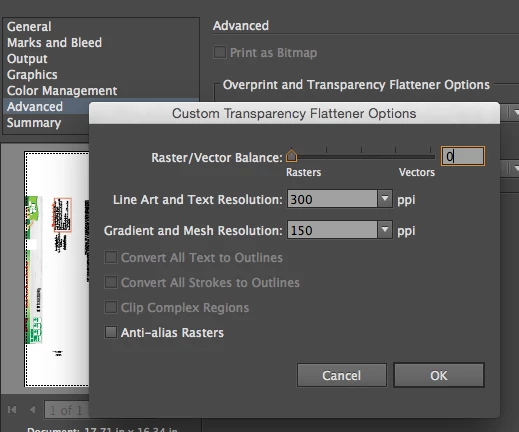
    Another way to resolve this is to slid all the way to rasters. If you set your resolution high enough you will get the max quality of that printer.

    7 replies

    chuck.heather
    Participant
    Jan 4, 2025 6:41 AM UTC

    I had the same ghost box and none of these suggestions quite fixed it, but I found that when I increased the bounds of the shadow to 400% the box disappeared. (Effect - 3D Materials - Lighting - Shadow Bounds)

    Translate
    Mike_Gondek10189183
    Community Expert
    Community Expert
    Mar 31, 2017 4:56 PM UTC

    Do you have spots?

    or

    Translate
    Kurt Gold
    Community Expert
    Community Expert
    Mar 31, 2017 4:56 PM UTC

    Which version of Illustrator are you using. What printer? What print settings? What do you mean by "ghost box"? Can you take a photo and post it?

    Translate
    dedine3Author
    Known Participant
    Mar 31, 2017 5:28 PM UTC

    Which version of Illustrator are you using. What printer? What print settings? What do you mean by "ghost box"? Can you take a photo and post it?

    Here are more details.

    I use Illustrator CC.

    Document in RGB

    Printer : HP color laserJet

    It is difficult to see on a picture, so I made a "simulation" of the effect I see on paper. See attached document.

    I add dot red line around the ghost box.

    There is a box like that around every object that has drop shadow effect.

    Translate
    Mike_Gondek10189183
    Community Expert
    Mike_Gondek10189183Community ExpertCorrect answer
    Community Expert
    Mar 31, 2017 7:47 PM UTC

    Why is your document RGB?

    Set your document color mode to CMYK and try the suggestions I posted.

    Another way to resolve this is to slid all the way to rasters. If you set your resolution high enough you will get the max quality of that printer.

    Translate