Known Participant
June 8, 2017
Answered

Gradient across squares

  • June 8, 2017
  • 2 replies
  • 375 views

I'm sure there's a simple way of doing this, possibly using the blend tool or gradient tool, but I don't know what it is!

I'm trying to blend a colour between two points using squares and having to do it manually (see image)

I was hoping there was a quicker way to blend these rather than clicking each diagonal line of squares and tweaking the colour individually.

Any ideas?
This topic has been closed for replies.
Correct answer Ton Frederiks

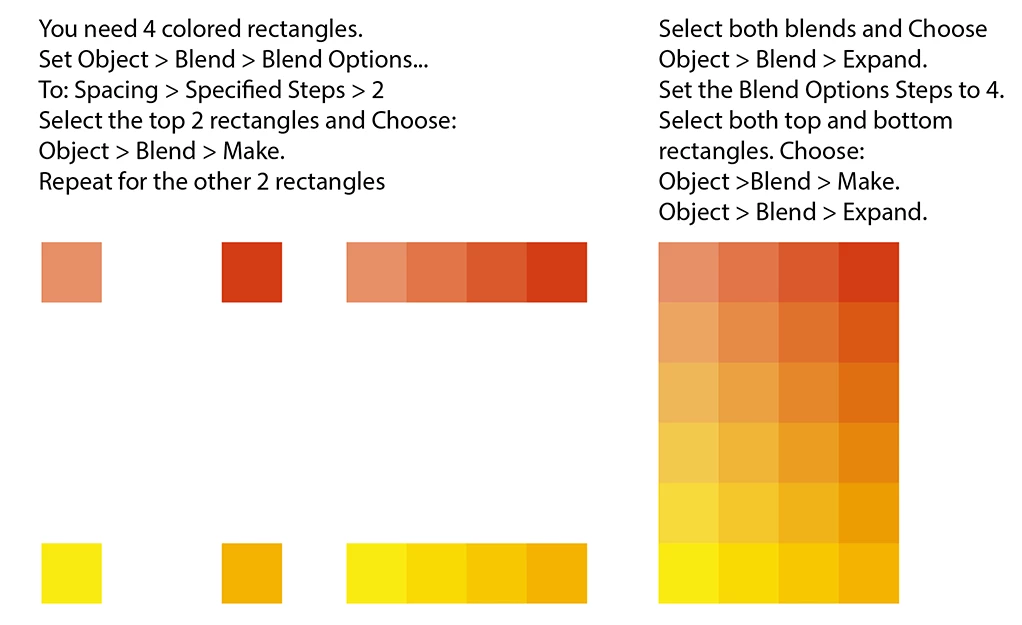
Use blends like this:

2 replies

rcraighead
Legend
June 8, 2017

You can also start with your finished rectangles and blend their colors using the "Edit Colors>Blend" options:

Ton Frederiks
Community Expert
Ton FrederiksCommunity ExpertCorrect answer
Community Expert
June 8, 2017

Use blends like this: