Participant
December 3, 2017
Answered

Gradient fade to black without simulating colored paper

  • December 3, 2017
  • 2 replies
  • 2446 views

I need to create a gradient that fades to black where black is the transparent color.  The only way I've been able to do it is set the "Simulate Colored Paper" on the File/Document Setup dialog.  I get what I want, which is a gradient like this:
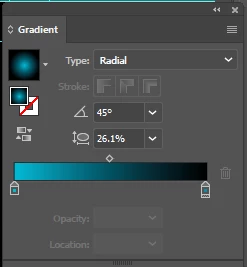
However, since I'm using the simulate command, when I go to print or generate a PDF, the black background isn't there.  The best I've been able to do is a gradient like this:

You'll notice the white "fuzz" around the color before it goes to black.  How can I produce the first gradient "normally", without using the "Simulate Colored Paper" option?

Thanks,

James
    This topic has been closed for replies.
    Correct answer Anna Lander

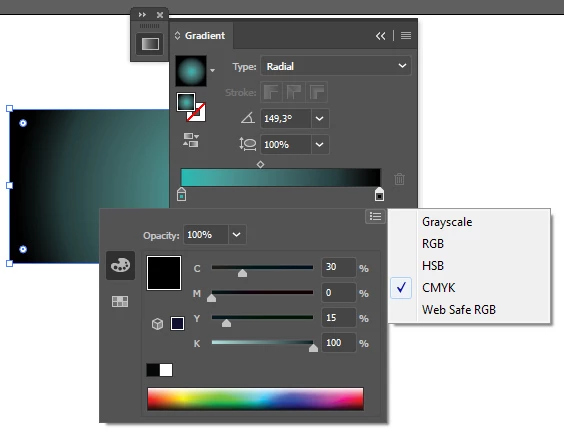
    the "fuzz" appears due to different color modes of gradient sliders and different ink using. The first slider is colorful and has CMYK mode, the second is Black in Grayscale. So the first thing is to adjust the modes.

    Then for the second slider create the "composite" black, adding some CMY colors

    Do you need the transparent fill at the edge or black one?

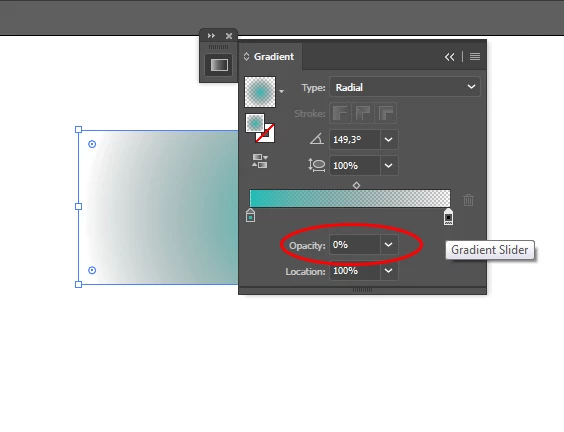
    If you need transparency, set the second slider opacity as 0

    2 replies

    Mylenium
    Legend
    December 3, 2017

    Why would you even do that? Unless you use a spot color, possiblywith a white underprint, printing on black paper is rare as gold. The rest seems to stem from a lack of understanding the print process and possibly not working in the right color mode, but you have not offered any info on that. To my eye it appears you are working in RGB mode, where of course the underlying math would produce certain intermediate colors simply based on linear interpolation of the individual color components. I'm also not clear why you don't just let the gradient fade to transparent and place it on top of a black solid object. That way at least the flattener settings in the PDF engine would take care of it based on the preset used. Again, it seems more like you need to understand those things rather than that there would be any genuine issues. Other than that you can always add more gradient color stops to compensate for muddy mix colors, though this may not print pristinely, either.

    Mylenium

    Anna Lander
    Anna LanderCorrect answer
    Inspiring
    December 3, 2017

    the "fuzz" appears due to different color modes of gradient sliders and different ink using. The first slider is colorful and has CMYK mode, the second is Black in Grayscale. So the first thing is to adjust the modes.

    Then for the second slider create the "composite" black, adding some CMY colors

    Do you need the transparent fill at the edge or black one?

    If you need transparency, set the second slider opacity as 0