
Inspiring
January 8, 2021
Answered

Gradient fill text appears black in Illustrator

  • January 8, 2021
  • 3 replies
  • 2315 views

Filling text with a gradient in illustrator (25.1) appears black. 

I have read another user with the same problem, they had to check the apperance panel instead of using the colour fill, this doesnt seem to work for me.


I'm sure there is somthing simple I have missed as I have done this many times in the past.


Any suggestions very welcome.
 

This topic has been closed for replies.
Correct answer matthewd72325586

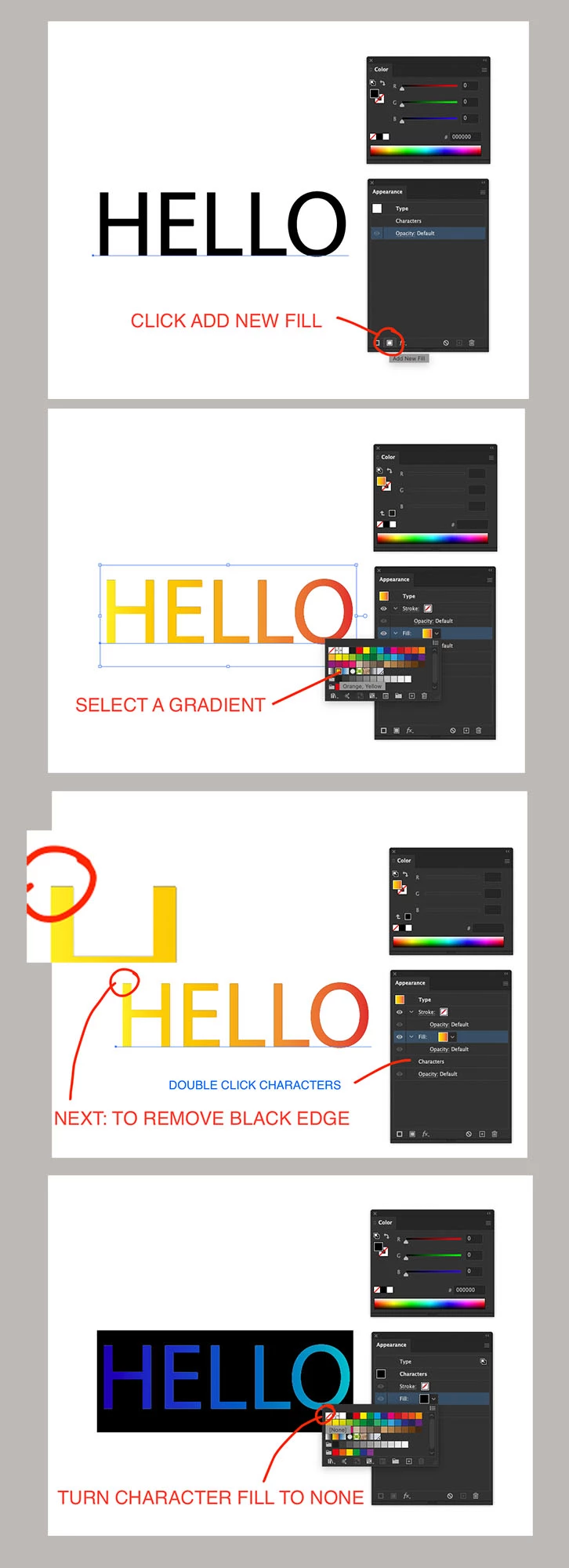
How to add a gradient to text in case anyone else gets stuck.


3 replies

matthewd72325586AuthorCorrect answer
Inspiring
January 8, 2021

How to add a gradient to text in case anyone else gets stuck.


Anna Lander
Inspiring
January 8, 2021

don't set a gradient as a main fill to the text. In Appearance panel add a new fill and set it as gradient.

You can even set the main fill as None: the advanced appearance has the higher priority.

Inspiring
January 8, 2021

Thank you for the answer!

I am sure I have been able to use the eyedroper tool in the past. This seems like a very round about way to do it. But I am sure there are reasons.


Monika Gause
Community Expert
Community Expert
January 8, 2021

Please show how this is set up in the appearance panel.

Inspiring
January 8, 2021

Monika Gause
Community Expert
Community Expert
January 8, 2021

You need to move the fill on top of the "Characters" in the appearance panel.