MahaB82A
May 29, 2024
Question

Gradient Issue

  • May 29, 2024
  • 2 replies
  • 672 views

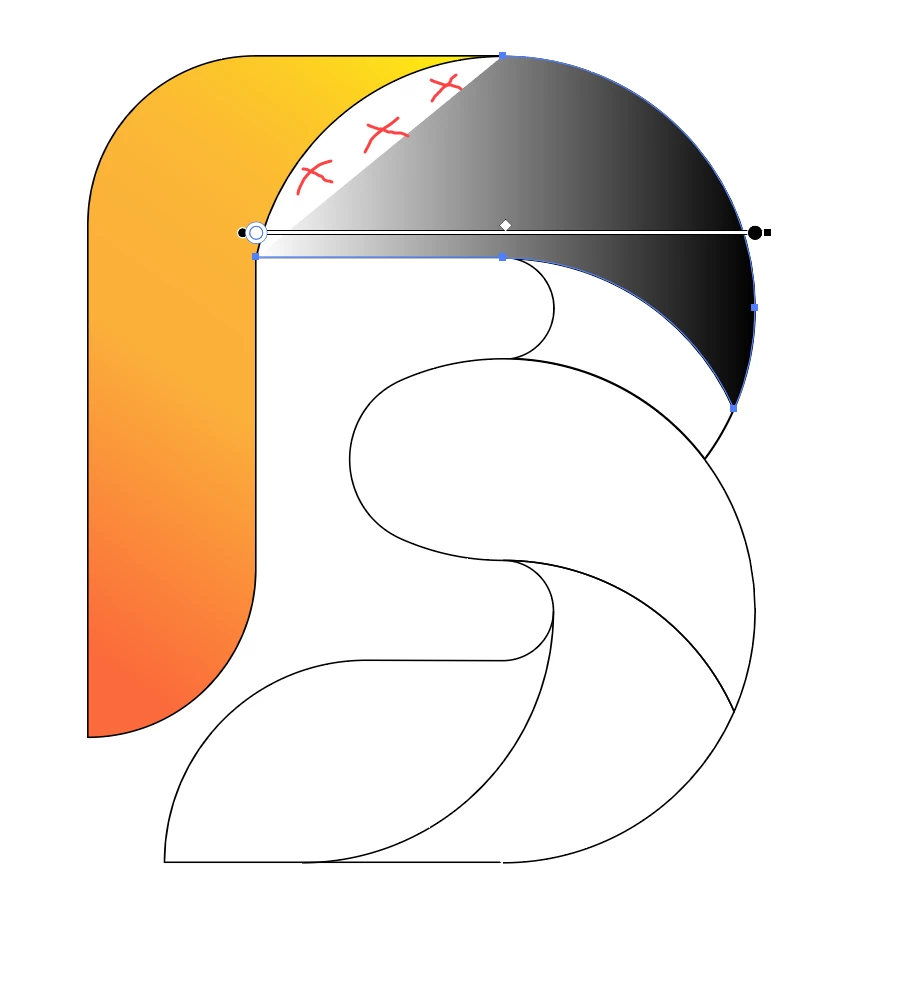
I tried to replicate this work. After finishing more than 50% of the work [time 8.0] I found gradient of this part does not come? Is there any way to fix this? Following screenshot of the Video also uploaded.

Tutorial Video


Video link of my issue

https://youtu.be/UYRDF-MJjis


This topic has been closed for replies.

2 replies

Community Expert
May 30, 2024

The path on which you are trying to apply the gradient does not look like it is closed. That's why it is not filling that curved area in the upper left portion of the shape. Different methods can be used to close the gap (shape builder tool, path finder operations, etc).

MahaB82A
MahaB82AAuthor
May 30, 2024

In the video author simply did everything. Is it edited video?  

Doug A Roberts
Community Expert
Community Expert
May 30, 2024

At the start of the video the shapes already exist.

Monika Gause
Community Expert
Community Expert
May 30, 2024

You need to first use Live paint or shapebuilder. Then apply a gradient.

MahaB82A
MahaB82AAuthor
May 30, 2024

I use Shape Builder Tool Options. I do not know about Live paint. Not only that in this tutorial using these tool is not shown.


Doug A Roberts
Community Expert
Community Expert
May 30, 2024

The video author has already created the shapes at the start of the video. They may have used live paint or shape builder to do this -- it's not possible to know without their input.