
Participant
December 26, 2019
Question

Gradient not blending properly

  • December 26, 2019
  • 3 replies
  • 3097 views

I'm always working with these two colors which blend together well. However, when I try to make a gradient with the two, I get this faded white right in the middle of the two colors. But when I use the blend option, it works and looks just how I want it to. 


I could just always use the blend option but it's just a couple extra steps compared to using the gradient tool which is much easier to use and manipulate. Am I doing something wrong with the gradient tool? Or is this just how it works?
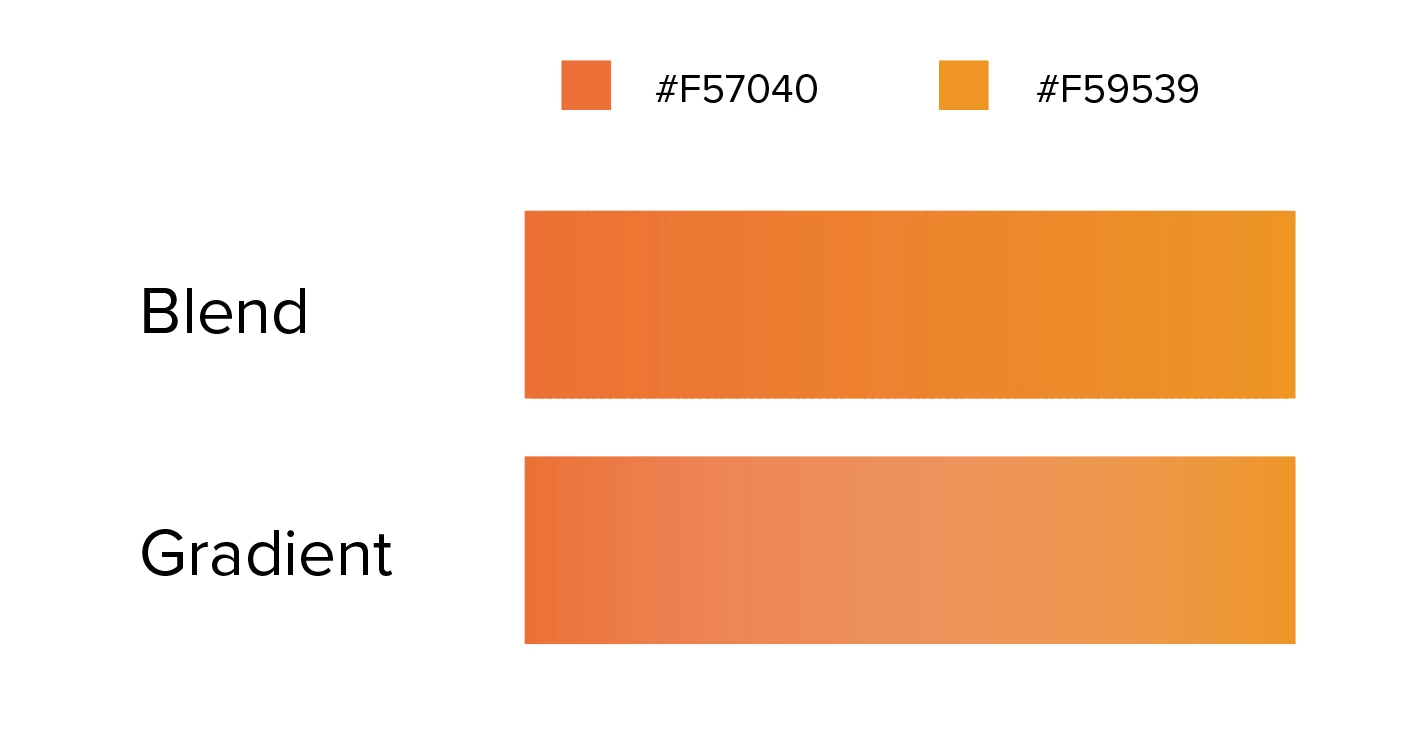
This topic has been closed for replies.

3 replies

Participant
May 19, 2023

Hi! 
I Just had the same issue and googled for a solution and came across this post. It caused me to ask in the office if anyone knew the answer. This worked for us: make sure all your colour swatches used to make the gradient are CMYK and not a mixture of CMYK and Pantone. I swapped my Pantone swatches to CMYK and the gradient worked perfectly.

silk-m
Community Expert
Community Expert
December 27, 2019

Hi,

In my environment there is no difference between blend and gradient. I think there are some problems in your environment.

macOS 10.15.2 + Illustrator 24.0.1

--Susumu Iwasaki
Participant
December 27, 2019

Hmm, that's strange. Thank you though for the clarification! I'll check that out on my end! 

Participant
September 28, 2020

I am having the same issue. Is there a solution?

Ashutosh_Mishra
Inspiring
December 26, 2019

Hi Joel,


Thanks for reaching out. I'd recommend checking out  https://helpx.adobe.com/illustrator/using/gradients.html for more information about Gradients and how you can create them using different options.


Hope it helps.


Regards,

Ashutosh