Participant
April 22, 2017
Answered

Gradient on stroke not working properly

  • April 22, 2017
  • 1 reply
  • 616 views

Hello!

I'm trying to put a greyscale gradient on a path's stroke. I need this for laser engraving, so it has to be as precise as possible.

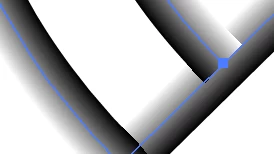
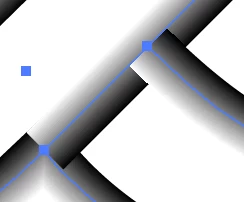
When I put the gradient on at this width, the stroke overlaps (see pictures)

anyone knows how I could fix this problem?

This topic has been closed for replies.
Correct answer tromboniator

Unless I misunderstand the question, if you start with a single shape, as Ton shows, is there any reason you can't just add line segments with gradient stroke applied across the gaps?

1 reply

Ton Frederiks
Community Expert
Community Expert
April 22, 2017

Try the Shape Builder Tool (Shift M) to make a single shape:

Participant
April 23, 2017

Hi Ton and thanks!

The problem is the shape I'm trying to engrave would be this

Where those lines cross in the middle there seems to be no way to get to a smooth gradient. I tried with shape builder now that you told me, but it doesn't really worked with those crossing lines in the middle.

I'm trying to get a gradient that is always completely black in the middle of this thick stroke and then fades to white at the extremes of it

tromboniator
Community Expert
tromboniatorCommunity ExpertCorrect answer
Community Expert
April 23, 2017

Unless I misunderstand the question, if you start with a single shape, as Ton shows, is there any reason you can't just add line segments with gradient stroke applied across the gaps?