
Gradient Panel - when choosing new colour the swatch panel is tiny
Hello,
I'm having a problem with my gradient tool/panel. When I want to change the color on the gradient "slider" I double-click on the little circle and usually, the swatches panel or color picker opens up. Now the swatches panel is opening up, but it is tiny and all you can see is one color and the eyedropper. There is no way to expand this box at all. For now, the workaround that I've come up with is to create a box with whatever color I might want and then use the eyedropper tool, but that's really annoying if you change your mind about colors. I'm including a screenshot so you can see what I'm dealing with:
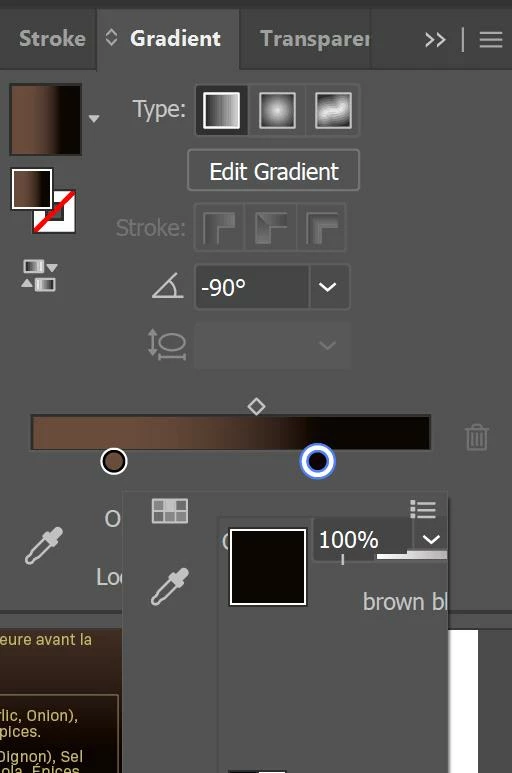
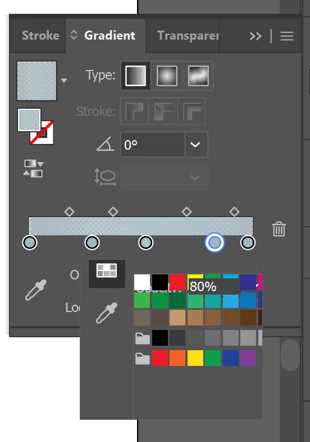
If I'm lucky I might get the panel the size of the second screenshot, but it's usually like the first picture.
This started out of the blue - no idea what caused it. I have tried rebooting my computer, uninstalling and reinstalling illustrator, closing the gradient panel, and switching workspaces, all with no change. I can't find anything online about it so far, so if anyone has a suggestion on how to fix this, I'd appreciate it. Thanks!
 AdChoices