Participant
March 8, 2017
Answered

Gradient Style cover photo in Illustrator
  • March 8, 2017
  • 2 replies
  • 411 views

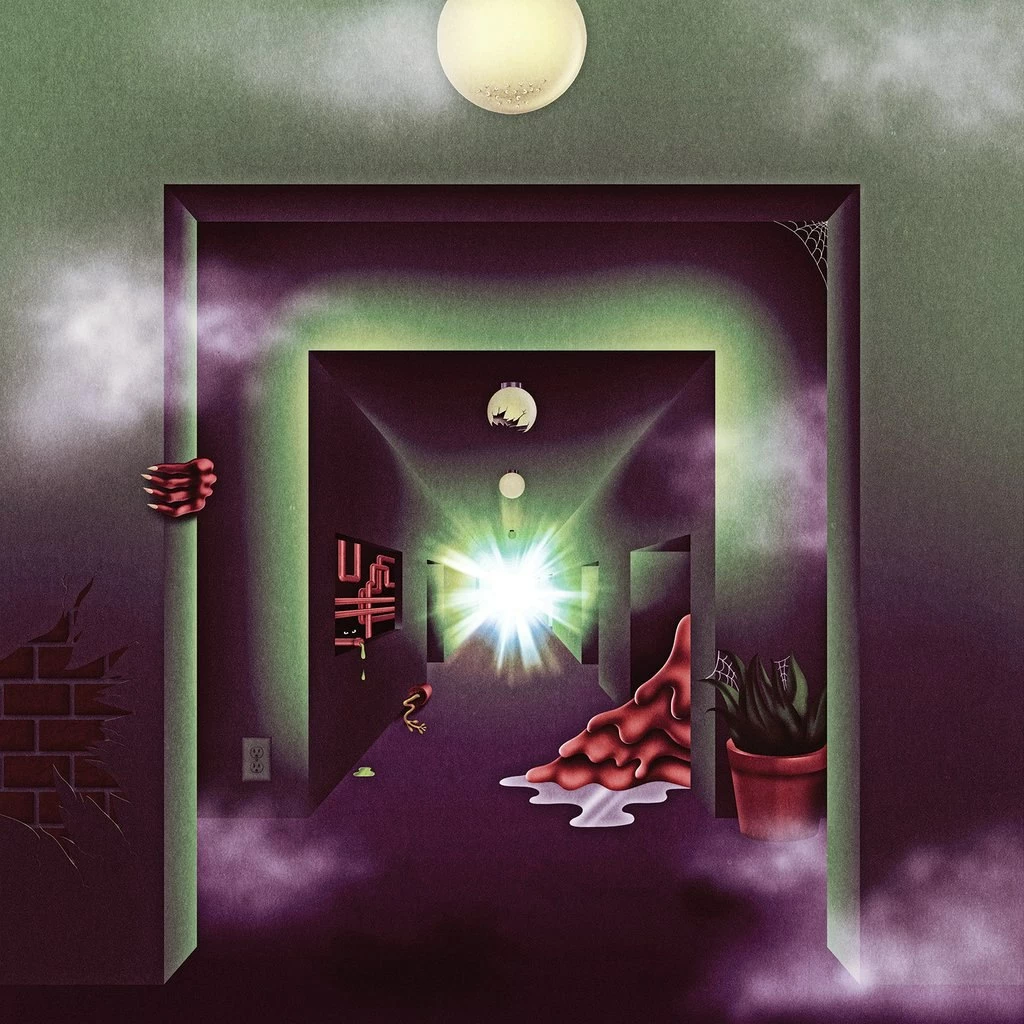
Hi everyone, here you can see a beautiful cover for a thee oh sees album a weird exits made by unknown (for me) artist. This is not the first time I am seeing such effects used in a certain manner. I love texture of an image very much therefore I am wondering is there a specific name or better a list of function to use in order to get this texture and quality. Am I confusing myself with thinking it's just gradient and grain?

This topic has been closed for replies.
Correct answer Mylenium

For the most part it's really just simple basic gradient shading, though presumably the image was created in Photoshop.

Mylenium

2 replies

Myra Ferguson
Community Expert
Community Expert
March 8, 2017

Here is a previous thread on using a gradient and grain that might help Change colour of grain effect in Illustrator.

Mylenium
MyleniumCorrect answer
Legend
March 8, 2017

For the most part it's really just simple basic gradient shading, though presumably the image was created in Photoshop.

Mylenium