Participant
September 28, 2018
Answered

Gradient VS Pattern Brush

  • September 28, 2018
  • 3 replies
  • 2077 views

Hi there!

I've been trying to use gradients to make pattern brushes and in order to have accurate colour shading on curved objects.

However, without rasterizing, then image tracing a gradient, you simply cannot use an object as any type of brush as long as it has a gradient.

Does anybody in this community of adobe gurus know how to magic this bummer away?

Many thanks!

Correct answer Muqqarib Hassan

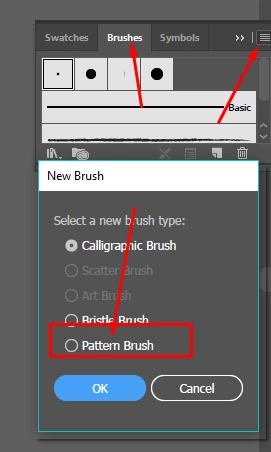
Hi, First create an object whatever you want it to be. Then create a gradient on it by selecting the object after that go to brush tool panel and add new brush as a pattern brush .

3 replies

Jacob Bugge
Community Expert
Community Expert
September 28, 2018

HuwanMind,

How about a Blend?

Ton Frederiks
Community Expert
Community Expert
September 28, 2018

A Blend would be another way, Jacob.

The blend will be expanded when you make it a brush, like an expanded gradient.

Jacob Bugge
Community Expert
Community Expert
September 28, 2018

Indeed, Ton.

I believe I (mis)read two questions into the OP, the second being a non brush way of creating customized colour transition resembling gradients on general/curved objects, based on "and in order to have accurate colour shading on curved objects", the and being the crucial word.

I may have been rash, after struggling for five hours to get the internet connexion to work again within office hours, after some unexpected and wrecking changes made by the provider.

Muqqarib Hassan
Muqqarib HassanCorrect answer
Inspiring
September 28, 2018

Hi, First create an object whatever you want it to be. Then create a gradient on it by selecting the object after that go to brush tool panel and add new brush as a pattern brush .

Participant
February 17, 2025

like the first question:  this is when I also get an error.  it seems pattern brush does not like gradients.

Monika Gause
Community Expert
Community Expert
February 17, 2025

Scatter brushes and art brushes don't like gradients either. Make a blend instead.

Ton Frederiks
Community Expert
Community Expert
September 28, 2018

You could choose Object > Expand and select a number of objects for the gradient.