leannee64177917
Known Participant
January 16, 2019
Answered

Gradients

  • January 16, 2019
  • 2 replies
  • 1645 views

I want to change the base color on both ends of multiple selected gradients, but it is not working.  I literally have maybe 80 separate gradients placed together to form an artwork and don't want to go back and change each one individually again. Is there a universal change? I have been ungrouping all of them and re-selecting my gradient tool. It seems like I can change the 100% color side, but when I try to change the lighter percentage side to a separate color, it does not work for all. I have even tried using the select same blending mode command, but just cant seem to figure it out. would like to save time to find a universal change of color. Help??
    This topic has been closed for replies.
    Correct answer Monika Gause

    I've never used the recolor artwork. I am playing with it now. I have a certain color library I must work with and a specific color. I found out how to specify the library within the recolor artwork box, but have no luck yet with it taking effect within the art. Still trying...


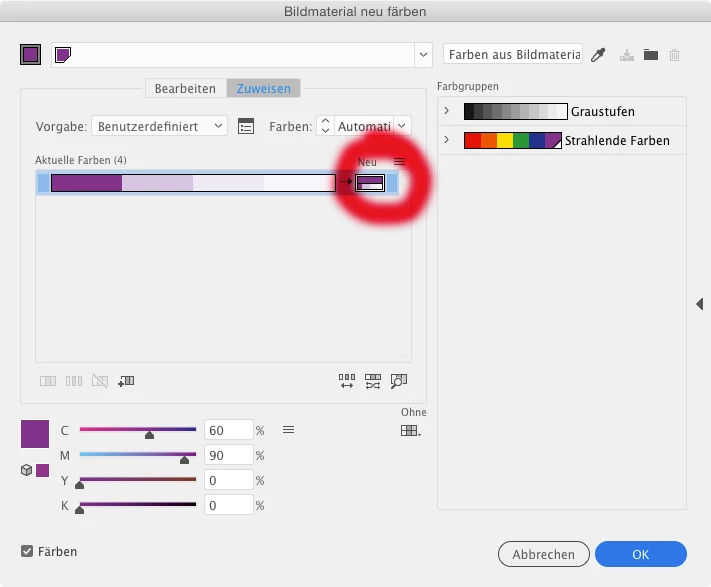
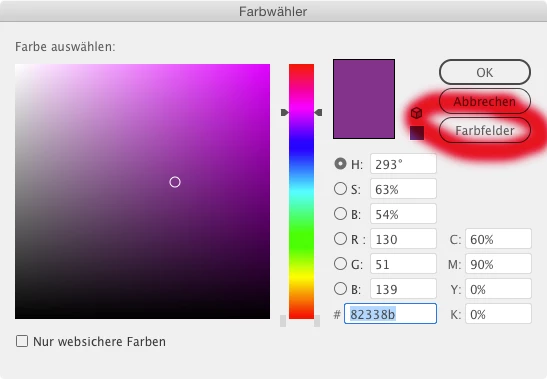
    Double click here:

    to get there. Then click here:

    To get there:

    And please read the documentation. Playing round won't get you anywhere with Recolor artwork.

    2 replies

    Danny Whitehead.
    Legend
    January 16, 2019

    If the base colour that you want to change isn't a global swatch, 'Add Used Colours' in the flyout menu of the Swatches palette may help.

    Or is it a global swatch that's applied to other objects that you don't want to change?

    leannee64177917
    Known Participant
    January 16, 2019

    Right... since I can't seem to change the percentage in my group selection, create a swatch that is the actual percentage and apply it. I will try that and see if I can still keep the same effect of the art.

    Danny Whitehead.
    Legend
    January 16, 2019

    The way I understood it, you want to keep the opacity percentages of the gradient stops the same, but change the color of them. Is that not correct?

    hammer0909
    Community Expert
    Community Expert
    January 16, 2019

    If you create a Gradient Swatch and apply that swatch to all of the elements, you can update them all by making a change to one, then holding down the alt/option key and dragging the new gradient from the current fill color to the existing Gradient Swatch in the Swatches panel and they will all update. That's assuming all of the gradient instances are using the applied gradient swatch. If however you've modified the applied gradient in each instance, they will no longer update when the Gradient Swatch is updated.

    leannee64177917
    Known Participant
    January 16, 2019

    Thank you Chad, I will fool around with that for a little... Some of my triangles have 80% on one end compared to the same end on another having 100%. Both ends are varying in each triangle. I am starting to believe that I will be forced to manually go into each triangle to change slider colors manually, uggggh! So I am now thinking, why did I make the art so complicated?

    Monika Gause
    Community Expert
    Community Expert
    January 16, 2019

    Can you try "Recolor artwork" for this?