
ludhall
Participant
October 25, 2017
Answered

Graphic glitches - Illustrator CC 2018

  • October 25, 2017
  • 6 replies
  • 18200 views

I recently switched to Illustrator 2018, and these graphic bugs are really annoying, and make the program next to useless. When zooming in/out these white boxes appears randomly everywhere.

Not that this is a stroke.
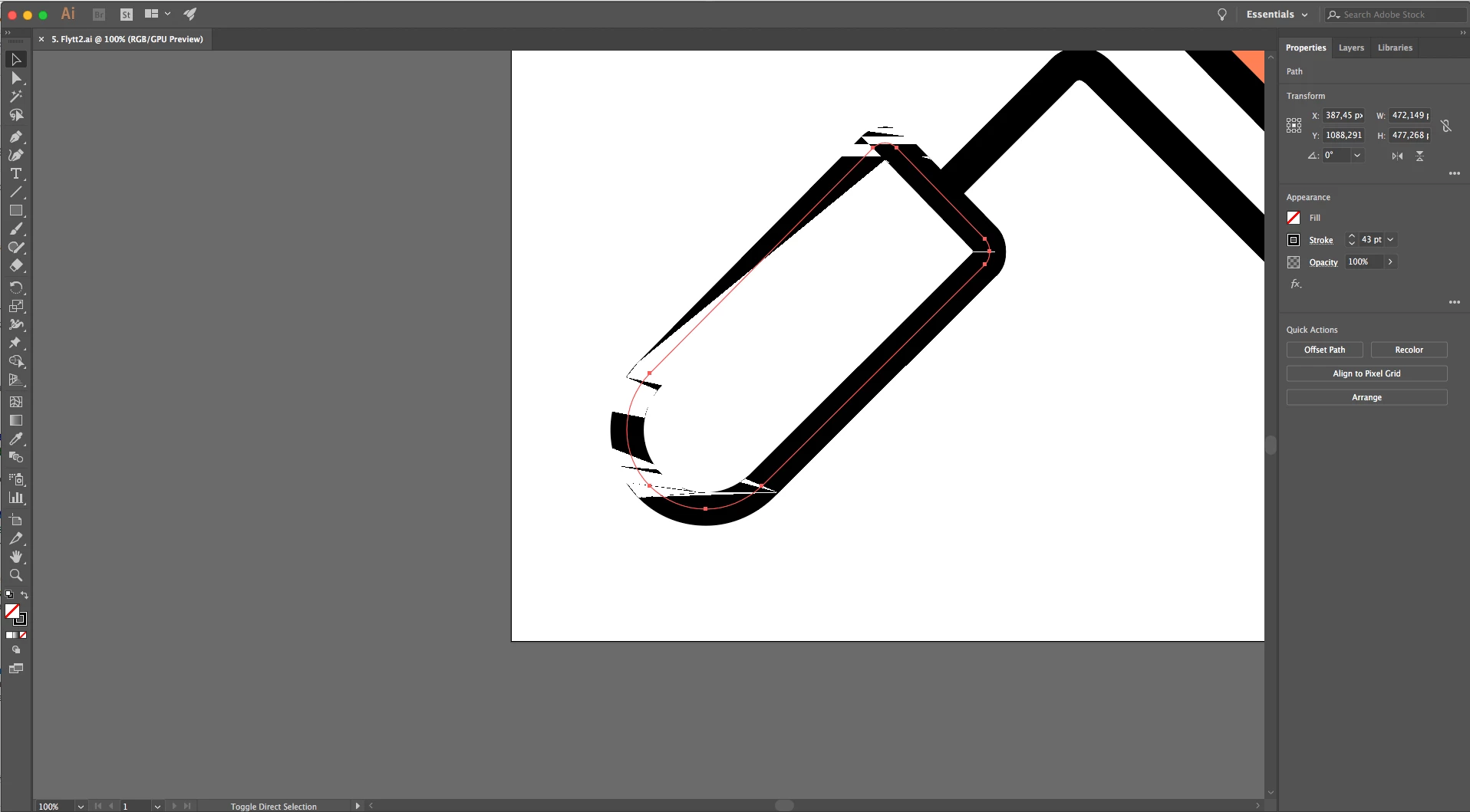
Anyone knows how to fix this?

This topic has been closed for replies.
Correct answer Doug A Roberts

looks like yet more GPU preview artifacts. toggle it off to check.

6 replies

Known Participant
June 4, 2018

Hello Adobe, is there any update for this yet? The problem isn't just on screen. Disabling the CPU preview hides the error on screen, but the problem is still showing on the exported file. Haven't been able to find a work around for this in any way, except for not using Illustrator 2018.

Bill Silbert
Community Expert
Community Expert
June 4, 2018

The problem is actually GPU Performance—not CPU. It is an onscreen viewing problem with the preview. If you are having a problem with the exported file then it is for some other reason. I would guess that possibly you've exported your Illustrator as a png or a jpeg and have enlarged it and are seeing pixelization. Please upload a screen shot of the problem to verify what the problem is.

Known Participant
June 4, 2018

I can replicate the problem on any Mac running Illy 2018. Place a 1-bit image, then rotate it. The artifacts appear. Toggling the GPU performance off and on hides the defect, but if you export to any format (preview on or off), the defect is present.

Participant
March 7, 2018

Hit Command & E withc will take you out of CPU preview will still runnign it smoothly. To go back just press command E AGAIN. (I use illustrator 2017)

Participant
December 16, 2017

Could this be it? Take a look at the first topic. Seems like Adobe and Apple are working on it!

Known issues - Running Illustrator CC on macOS 10.13 High Sierra

Hope they find the solution soon.

Doug A Roberts
Community Expert
Community Expert
December 16, 2017

that's the one.

Participant
December 10, 2017

I also have this same issue and it makes it next to impossible to work. Is this an Adobe problem or a macOS HS problem? I understand turning GPU acceleration off will "fix" the issue but that also means I'm going to be giving up performance. Is there a fix in the works?

Monika Gause
Community Expert
Community Expert
December 10, 2017

WBuck33  schrieb

I also have this same issue and it makes it next to impossible to work. Is this an Adobe problem or a macOS HS problem? I understand turning GPU acceleration off will "fix" the issue but that also means I'm going to be giving up performance. Is there a fix in the works?

It's a problem with compatibility between the OS, the graphic card drivers and Illustrator. Each time one of those gets an update, it's possible that something breaks.

Bill Silbert
Community Expert
Community Expert
October 25, 2017

I agree with Doug. You can access the option to disable GPU Performance quickly by clicking on the rocketship in Illustrator's top menu.

ludhall
ludhallAuthor
Participant
October 26, 2017

Thanks, it worked!

amandam38216193
Participant
January 30, 2018

Thanks SO much this has been bugging me for about a month or so!!

Doug A Roberts
Community Expert
Doug A RobertsCommunity ExpertCorrect answer
Community Expert
October 25, 2017

looks like yet more GPU preview artifacts. toggle it off to check.