
Participant
December 12, 2023
Answered

Gray Outline when tring to add gradient

  • December 12, 2023
  • 1 reply
  • 212 views

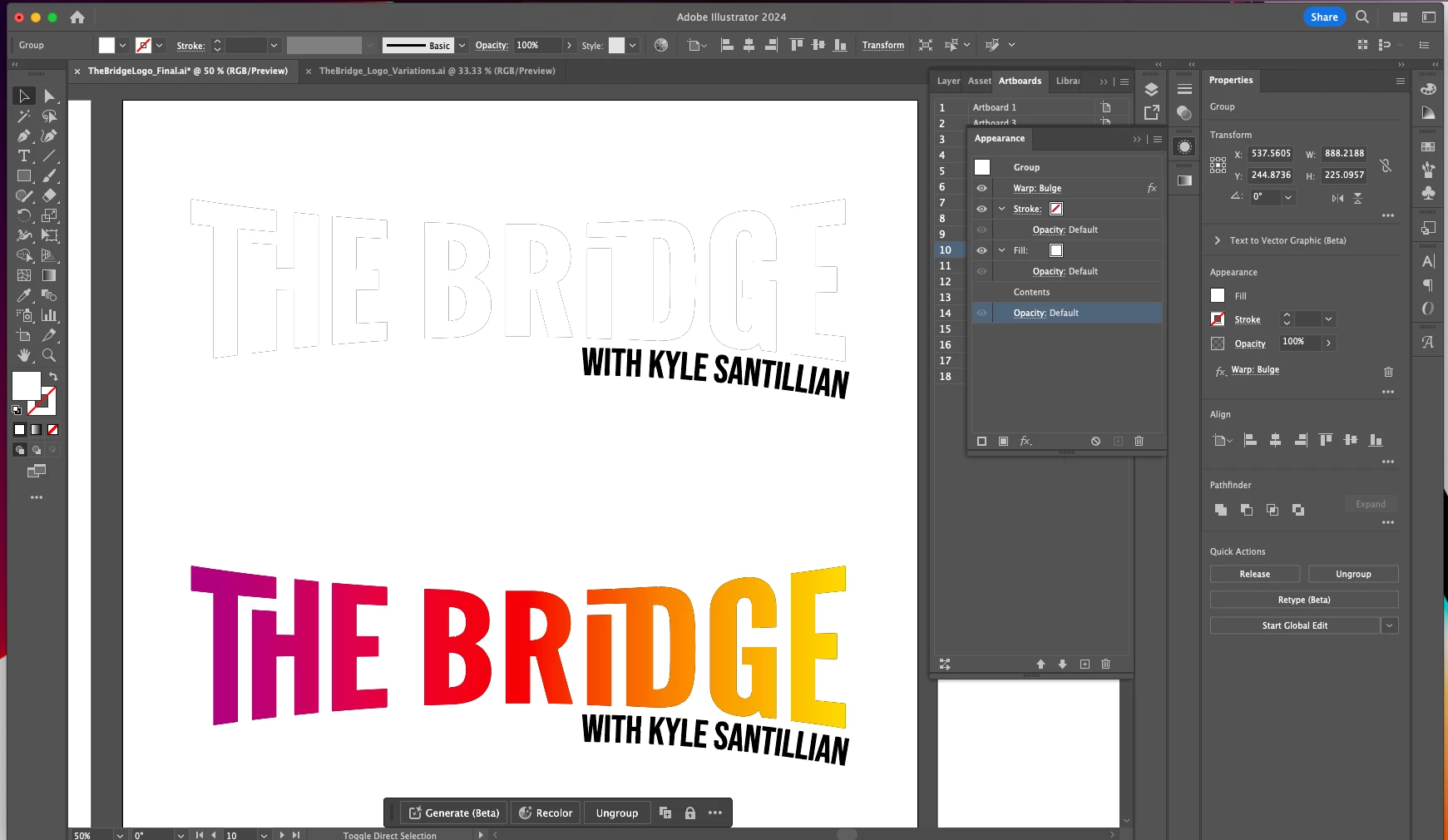
Hi, i'm trying to add a smooth graident to my type. I found that the best way to add the graident the way I want it is to go to the appearence pannel and add a fill. However, when I do that it creates a mystery gray outline around my text than i'm not sure how to get rid of.


If anyone has any suggestions on how to get rid of it I would be very greatful. I attached a picture of what is going on that includes my appearance pannel for reference.
 

This topic has been closed for replies.
Correct answer Ton Frederiks

Before adding the gradient, first remove the default fill from the type, set it to none.

1 reply

Ton Frederiks
Community Expert
Ton FrederiksCommunity ExpertCorrect answer
Community Expert
December 12, 2023

Before adding the gradient, first remove the default fill from the type, set it to none.

Participant
December 12, 2023

Thank you! I cant believe the solution was so simple!

Ton Frederiks
Community Expert
Community Expert
December 12, 2023

Good to hear that helped.