Participant
February 4, 2025
Answered

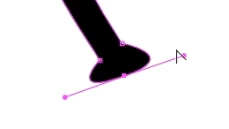
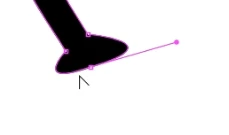
Half of the handle bar misses after edit.

  • February 4, 2025
  • 1 reply
  • 188 views

Hi folks,

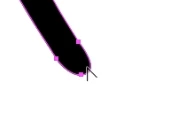
So, every time I move my handlebar, the other end of the handlebar disappears and cannot be edited. My professor said he had never seen anything like this and it is also very confusing to him. I will attach screenshots so you know what exactly it looks like. ( The process is, firstly I drag out the handles on the anchor point, then I drag the one on the right for editing, after I release my mouse, you see how the left one just disappears?)

Is there anything in the setting that I need to change?


Correct answer Monika Gause

The two buttons in the video where it says "Griffe"

https://youtube.com/shorts/B53fhYZpI2Q?feature=share


In the video you can also see how this behaves.

1 reply

Monika Gause
Community Expert
Community Expert
February 4, 2025

What happens when you use the direct selection tool for editing?

There is a button in the control panel with which you can activate that all handles show.

Also: Is that just one anchor point at the bottom or are there 2 of them?

Participant
February 4, 2025

Hi Monika, 

Thanks for replying. The direct selection works good, however I cannot bend the handles into desired angles with it. And there's only one at the bottom, the other one I assume is hiden. Would you mind taking a screen shot of the activate all handles function you mentioned?

Monika Gause
Community Expert
Monika GauseCommunity ExpertCorrect answer
Community Expert
February 5, 2025

The two buttons in the video where it says "Griffe"

https://youtube.com/shorts/B53fhYZpI2Q?feature=share


In the video you can also see how this behaves.