


Participant
Aug 31, 2023 1:37 AM UTC
Question

Having an issue with my font, need help please.

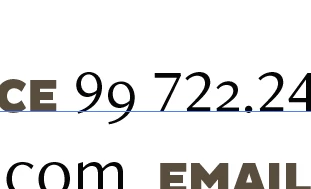
So I am working on an illustrator file that is only 6 month old. I went to change the phone number but the numbers are turning out different and I dont know what has changed to cause this. I have the two examples in the photo. The 9 and 2. Left 9 is the origional and the right 9 is what happens when I type now. It is the same with the number 2. Left 2 is orgional and right 2 is what shows up now. Also tried the number 6 and it shows up taller then the rest of the numbers. All font settings show up the same. By chance does anyone know what is happening and how to fix?
 

This topic is closed to new replies. Start a new post to keep the conversation going.

5 replies

Monika Gause
Community Expert
Community Expert
Aug 31, 2023 1:07 PM UTC

Those are old style figures. You want normal ones

Translate
Participant
Sep 1, 2023 12:05 AM UTC

Would I set it to "Tabular Lining" or Proportional Lining?

Translate
Monika Gause
Community Expert
Community Expert
Sep 1, 2023 12:12 AM UTC

The Lining is about the horizontal spacing of the letters when you type them. For a business card you want it proportional. For a business report you want it tabular.


Translate
Ton Frederiks
Community Expert
Community Expert
Aug 31, 2023 5:21 AM UTC

Can you check the setting for Figure in the OpenType panel?

Translate
Participant
Aug 31, 2023 12:52 PM UTC

It is set to Default Figure.

Translate