
Participant
August 31, 2023
Question

Having an issue with my font, need help please.

  • August 31, 2023
  • 2 replies
  • 225 views

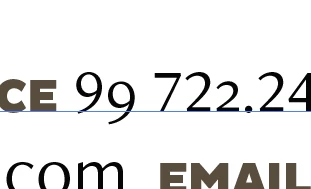
So I am working on an illustrator file that is only 6 month old. I went to change the phone number but the numbers are turning out different and I dont know what has changed to cause this. I have the two examples in the photo. The 9 and 2. Left 9 is the origional and the right 9 is what happens when I type now. It is the same with the number 2. Left 2 is orgional and right 2 is what shows up now. Also tried the number 6 and it shows up taller then the rest of the numbers. All font settings show up the same. By chance does anyone know what is happening and how to fix?
 

This topic has been closed for replies.

2 replies

Monika Gause
Community Expert
Community Expert
August 31, 2023

Those are old style figures. You want normal ones

Participant
September 1, 2023

Would I set it to "Tabular Lining" or Proportional Lining?

Monika Gause
Community Expert
Community Expert
September 1, 2023

The Lining is about the horizontal spacing of the letters when you type them. For a business card you want it proportional. For a business report you want it tabular.


Ton Frederiks
Community Expert
Community Expert
August 31, 2023

Can you check the setting for Figure in the OpenType panel?

Participant
August 31, 2023

It is set to Default Figure.