


Known Participant
September 8, 2025
Question

HELP * AYUDA

  • September 8, 2025
  • 1 reply
  • 224 views

Mi computadora se apagó y cuando la volví a encender mi archivo Illustrator ya no abre.  Me aparece esta ventana al intentar abrirla
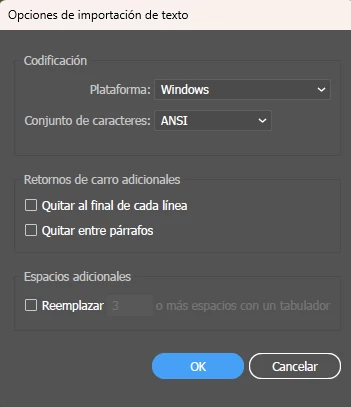
 

No puedo encontrar ningún backup en la carpeta donde se supone se guardan los backups o autosaves. (la que tengo elegida en Preferencias)

Por favor que alguien me ayude!. 

Gracias!

1 reply

creative explorer
Community Expert
Community Expert
September 9, 2025

@TahiaDesign did you do a recent update? Or did something recently to your computer? What changed?

m
Known Participant
September 9, 2025

Nothing! it just didn´t open when I started working today. So frustrating 😞

Besides that, I found there was no backup file under the folder I set in my preferences. No .aid file. I only see .aishm files I cannot open

creative explorer
Community Expert
Community Expert
September 9, 2025

@TahiaDesign Illustrator has started using, replacing the older .aid format with .aishm files, a new type of recovery file. The crash or improper shutdown can sometimes corrupt the main .ai file and leave only these .aishm recovery files behind, which are essentially useless. Even though set the auto-saved in your preferences,  if the crash happens before the auto-save interval, or if there's an issue with the cloud syncing or the local drive where the backups are stored, the backup file won't exist.


The window you're seeing in the screenshot is an attempt by Illustrator to open a file it doesn't recognize as a standard .ai file. It's trying to treat it as a plain text file. This is another sign that the file has become corrupted.


The original .ai file that won't open. Is it 0 KB? Or does it have a size? If it has a size, there might be a slim chance of recovery. Honestly, the chances of recovering the file directly are low if only the .aishm files remain!

m