


Help, I can't get Illustrator back on my computer!
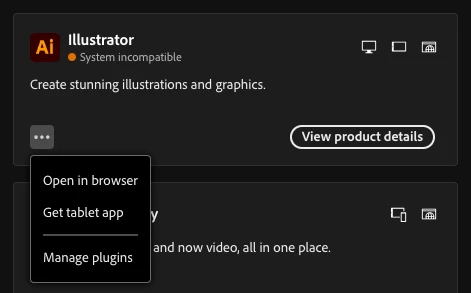
I'll make this as brief as I can, but I deleted Illustrator (with the intention to re-install it) because after messing with some files on my work mac the app started acting funky (all my tool windows were gone, wasn't registering when I clicked on my saved workspace, and the option to reset it/create a new one was greyed out). I'm not sure if the files I messed with were related, I just know that much. Well when I went to go download it again, I saw what I already knew which is that my macOS is too outdated for the 2025 version of the app. So I looked up how to download an older version, because I at least know that the 2023 version is compatible. Sources online tell me that I can click on the three dots to view older versions, but that's not an option (screenshot provided). I need help, I really need Illustrator on this computer and I can't do anything about the outdated macOS (not enough storage to update, which is why I was messing with files to begin with).
 AdChoices