tpk1982
Legend
December 21, 2015
Answered

Help me for finding expandable fill color

  • December 21, 2015
  • 2 replies
  • 1380 views

Hello Everyone,

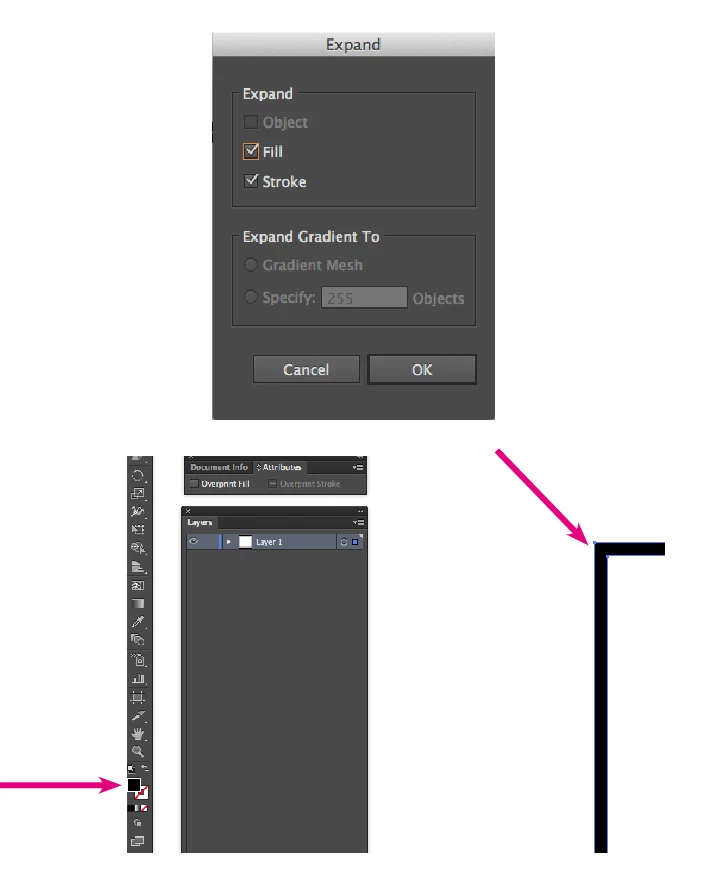
In my illustrator file, i have some objects stroke color filled with expandable fill color. I need to find all this and change as stroke color with "Black"color. I am not sure i explained you clearly. Hope the below screenshots give better picture.

I tried app.executeMenuCommand ('expandStyle'), but it is not working.

Advance thanks,

Karthi

This topic has been closed for replies.
Correct answer Stephen Marsh

Hi All,

Sorry for the delay in response. Thanks for your replies.

My clients getting files from vendors, some files are old and don't know who was created. Anyhow my task is, i need to see this kind of stroke (fill actually). One more thing we can't control to give specific color or not using expanding feature, because it more like impossible to advice all freelancers or designer not to follow this.

I have no idea about this compound path. From selection menu we can't separate the other fills with compound path objects i hope.

Regards,

Karthi


From selection menu we can't separate the other fills with compound path objects i hope.

As I mentioned, one has to look outside of native Illustrator features to select by compound path.

Links to some great selection add-ons can be found here:

prepression.blogspot.com.au/2015/01/illustrator-selecting-similar-objects.html

2 replies

Vinicius Baptista
Inspiring
December 21, 2015

Hi Karthi, I was thinking about you said and a not sure what's the best way to make this selection because usually before you use the Expand effect your object is a simple pathItem with Stroke or Fill color, and after apply the expand effect you have a groupItem with filleds pathItems.

Your objects have a specific color, appearance, effect or anything exclusive? Maybe you find something in "select" menu to select them, or if there is a exclusive color, we can write a script to select and change them.

Best regards

-Vinicius

tpk1982
tpk1982Author
Legend
December 21, 2015

Hi Vinicius,

Thanks for your reply. I tried in Select menu. But no use.

Vinicius Baptista
Inspiring
December 21, 2015

hummmm

I suggest you apply one different color in your items before expand them, this way you can manipulate all items after expand.

Or you can change what you want before expand, 'cause you can find the objects depending of yours properties like strokeWidth, colors or others properties.

Please let me know what the purpose of you want to do this, maybe we can find another satisfactory way.

I hope helped.

See you,

-Vinicius

tpk1982
tpk1982Author
Legend
December 21, 2015

Hi Experts,

Any suggestions? I am learner in Illustrator, so not sure how to get this.

Thanks,

Karthi