
Participant
November 7, 2023
Question

Help Please!!!
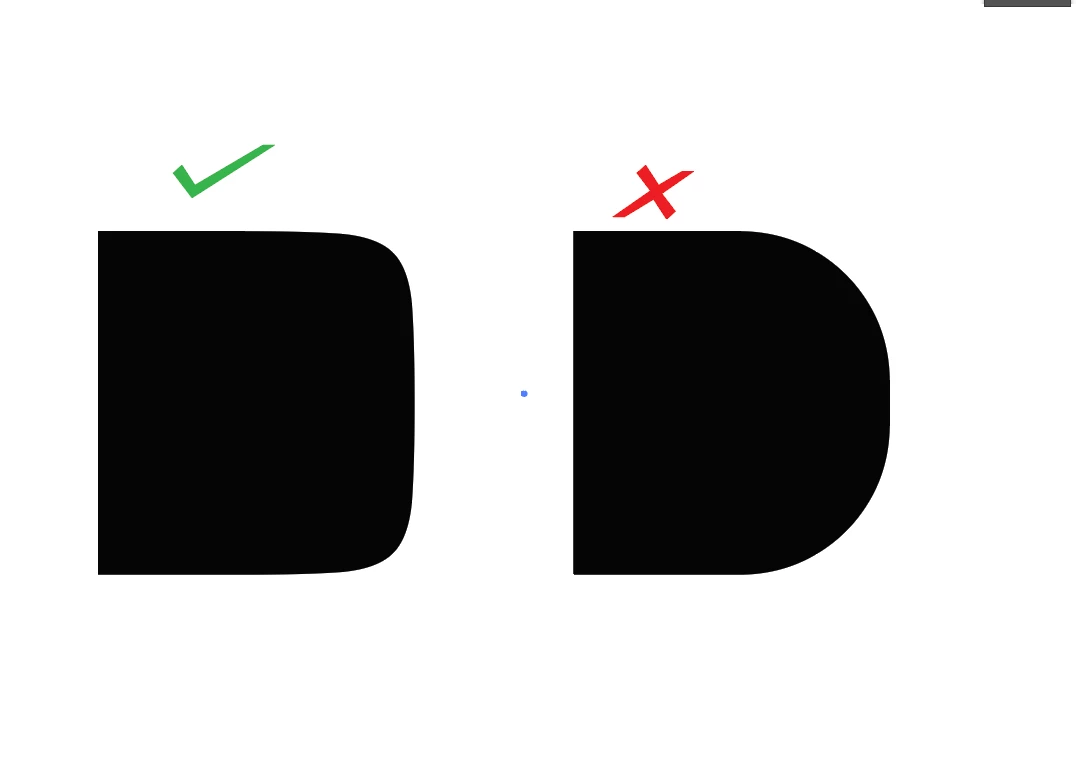
  • November 7, 2023
  • 1 reply
  • 218 views

Illustrator seems to have a glitch when exporting these shapes to other programs. The shape on the right is what I am looking to export yet on export the shape result is different and I instead get one with more rounded corners.  How can I keep the shape on the left as is and not have it change when exporting?


This topic has been closed for replies.

1 reply

Doug A Roberts
Community Expert
Community Expert
November 7, 2023

1. How did you create the rounded corners?

2. What format did you export?

3. What software are you viewing the right-rand shape in?

Participant
November 7, 2023

hi @Doug A Roberts thanks for the reply.

I created them in Illustrator. Shape tool and alternatively tried the pen tool. I have tried to copy-paste or to export as SVG or eps but it seems to add this extra rounding for some reason. I export to fontself, which also happens when exporting to Fontlab.

Monika Gause
Community Expert
Community Expert
November 7, 2023

Can you show the paths and anchors/handles?

You create the font with FontSelf directly in Illustrator?

Does the rounding appear in Fontself/Fontlab or after using the font? Or when you open the EPS in Illustrator as well?