Troy789
Inspiring
March 17, 2022
Answered

Help - stroke settings

  • March 17, 2022
  • 6 replies
  • 860 views

Could anyone tell me what setting to change?


I keep seeing a thick outline even if my shapes have a thin / no stroke.  
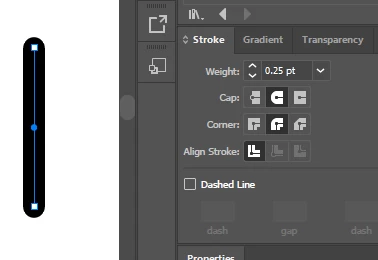


Below is an image showing a line with no stroke or fill yet the line is still black



This topic has been closed for replies.
Correct answer pixxxelschubser

Check the Appearance of your layer "Outlines" in the Appearance Panel. (Do you see the filled circle rght beside the layers name in Layers Panel in your last screenshot?)

6 replies

pixxxelschubser
Community Expert
Community Expert
March 17, 2022

 … mostly by mistake

pixxxelschubser
Community Expert
Community Expert
March 17, 2022

Click on the filled circle right beside the layers name in Layers Panel

Troy789
Troy789Author
Inspiring
March 17, 2022

why did the stroke apply to the whole layer?

Dave Creamer of IDEAS
Community Expert
Community Expert
March 17, 2022

>>why did the stroke apply to the whole layer?

That's what that feature does. It applies appearance settings, including effects, to any on that layer. Move something to that layer and it will suddenly display the settings.


Likes

 
David Creamer: Community Expert (ACI and ACE 1995-2023)
pixxxelschubser
Community Expert
pixxxelschubserCommunity ExpertCorrect answer
Community Expert
March 17, 2022

Check the Appearance of your layer "Outlines" in the Appearance Panel. (Do you see the filled circle rght beside the layers name in Layers Panel in your last screenshot?)

Troy789
Troy789Author
Inspiring
March 17, 2022

how do you check the appearance of a layer?

Legend
March 17, 2022

In addition to checking Appearance for the object, check Appearance at the Layer level.

pixxxelschubser
Community Expert
Community Expert
March 17, 2022

… and also check the parent Group/Sublayer/Layers Appearance.


Please show a screenshot with selected item and visible Layers Panel.

Troy789
Troy789Author
Inspiring
March 17, 2022

Ton Frederiks
Community Expert
Community Expert
March 17, 2022

Did you check the Appearance panel for additional strokes?

Troy789
Troy789Author
Inspiring
March 17, 2022

Ton Frederiks
Community Expert
Community Expert
March 17, 2022

Can you show the entire Appearance panel?
