
Answered
Help Using Edit Menu => Recolor Artwork
I'm trying to switch two colors.
And I can't seem to do it.
Here's the screen I'm getting.
I can't seem to switch the white background! How can I switch the white color?
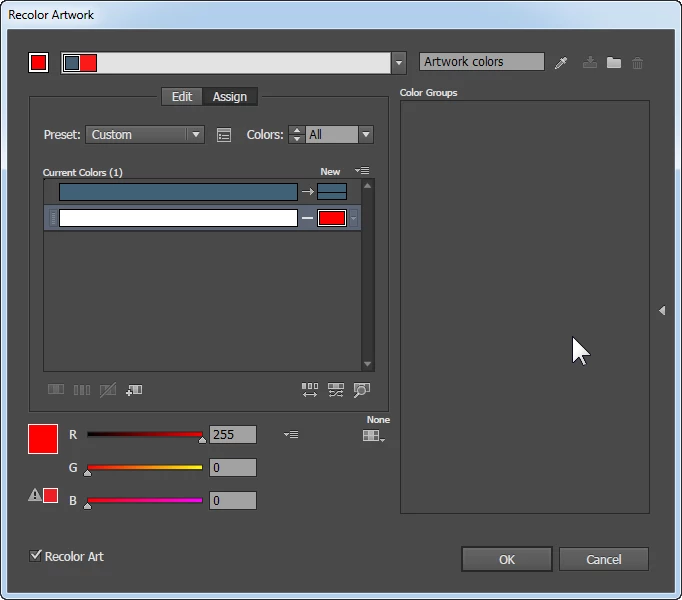
I'm trying to switch two colors.
And I can't seem to do it.
Here's the screen I'm getting.
I can't seem to switch the white background! How can I switch the white color?
Hi Michael:
I chose the route (and answer to my question above) because it seemed to be the easiest to do.
All I want to do is 1) have my white changed into one color (and, as you saw, the white is NOT in a separate layer)
And 2) I want my simple one-color logo to be a different color.
Do I know anything swatches? I'm afraid to say "Yes" because I did about -- Are you stting down?-- I did about 20 hours of tutorials --all very clear and informative-- and yet,I still feel I'm an illustrator dum-dum! I see swatches on the right side of my screen but I don't know how to use them
I'll do exactly what you tell me to do but realize that I'm only a 20 hour old illustrator student.
It looks like (but I could be wrong) the problem is that you are trying to fill in the empty spaces inside the artwork that appear to be white. They appear white simply because the drawing board behind the art is white but otherwise there is nothing there to fill. Illustrator normally needs a shape to put color into and there probably is no shape there. The shape IS there for the red part of the Illustration but not for the internal spaces that appear to be white.
You can select the art and then switch tool to the Live paint bucket and click on the art once again. Live Paint can fill in the spaces between objects in Illustrator so once you’ve activated it, you can choose a white swatch in the swatches panel and click the space in the art that needs to be white with the live paint bucket and it will indeed turn white.
Already have an account? Login
Enter your E-mail address. We'll send you an e-mail with instructions to reset your password.
 AdChoices