


Inspiring
October 14, 2025
Answered

Help with CAD import scale

  • October 14, 2025
  • 1 reply
  • 86 views

Hello,

I am trying to import a CAD drawing at the "drawn" scale. Here are the settings my file is using to export:
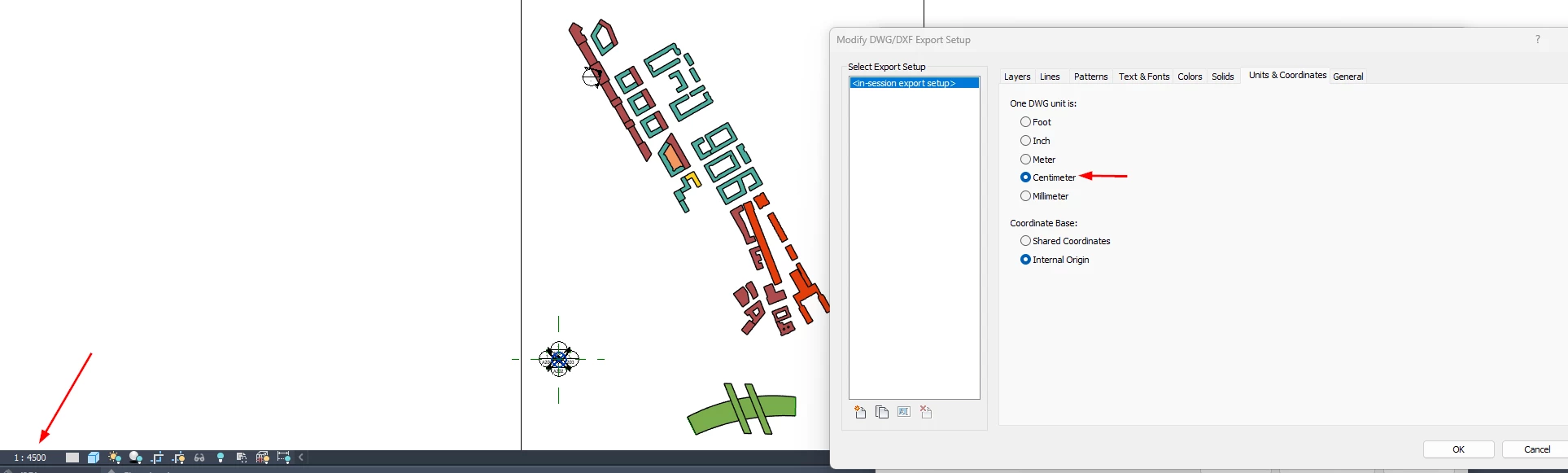
Scale = 1:4500 (same scale as Illustrator document)

Drawing units = centimeters


So far I have not identified the correct combination of settings to bring this in at the correct scale.

I am trying to import at 100% with 1 unit = 1cm, but the drawing is huge.

Can anybody please offer a suggestion for how to do this?

Thanks!
 

Correct answer Charlie329572228uvx

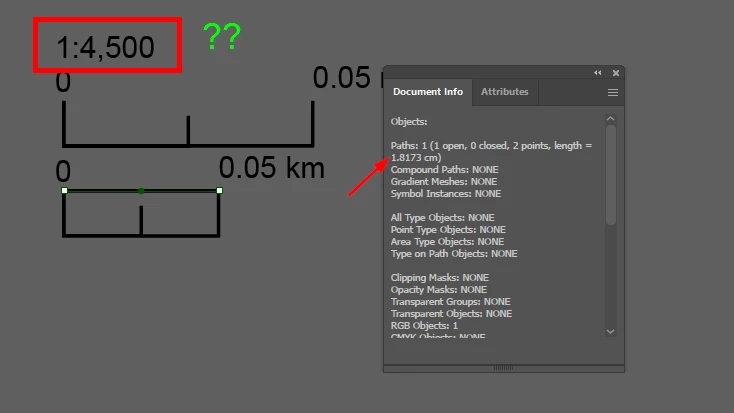
Calculating the "actual scale value" from the graphic scale, which was generated by a plugin, provided the correct import settings.

5000 cm / 1.8173 cm = 2751

Import settings used: 2751 units = 1 CM

Not sure what is going on with the 1:4500 business, but it's from a plugin so I will keep pressing them for answers 🙂


1 reply

Charlie329572228uvxAuthorCorrect answer
Inspiring
October 14, 2025

Calculating the "actual scale value" from the graphic scale, which was generated by a plugin, provided the correct import settings.

5000 cm / 1.8173 cm = 2751

Import settings used: 2751 units = 1 CM

Not sure what is going on with the 1:4500 business, but it's from a plugin so I will keep pressing them for answers 🙂