Participant
November 3, 2019
Answered

Help with file size

  • November 3, 2019
  • 1 reply
  • 745 views

I made this simple poster with AI. I only use pen tool and a few shapes. I overlay a lot of grain texture to most of the object in the poster. The .ai file size became 120 mb in the end. 120 mb?????? It's not even an intricate design. Anyone got the idea why the file became so huge?
This topic has been closed for replies.
Correct answer キィィ─!!!

Hello, papoorika
"Photoshop Effects" expresses the effect of bitmap images, so the file size increases.
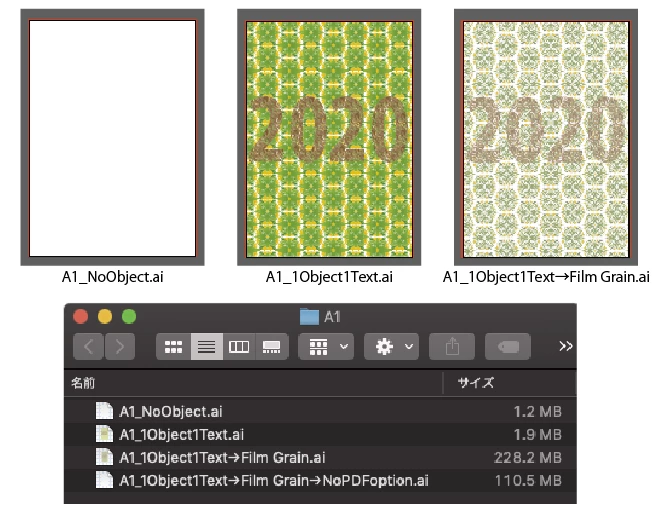
I tried with A1 size data.


Nothing: 1.2MB
Patterned square and patterned text: 1.9MB
"Photoshop Effects"> "Film Grain": 228.2MB

Even if you uncheck the PDF compatible file, it became 110.5MB.

1 reply

キィィ─!!!
キィィ─!!!Correct answer
Participating Frequently
November 3, 2019

Hello, papoorika
"Photoshop Effects" expresses the effect of bitmap images, so the file size increases.
I tried with A1 size data.


Nothing: 1.2MB
Patterned square and patterned text: 1.9MB
"Photoshop Effects"> "Film Grain": 228.2MB

Even if you uncheck the PDF compatible file, it became 110.5MB.

papoorikaAuthor
Participant
November 3, 2019

Thank you so much! I checked the files again and removed the grains texture, the file size reduced greatly indeed!