Participant
September 19, 2017
Answered

HEX code colors not stable in the CC Library in Illustrator or Photoshop

  • September 19, 2017
  • 2 replies
  • 6385 views

Currently we have been working with Brand colors which set in HEX code so we tried to import them from a document to the CC Libary and corrected them there. But they don't stay fixed there  and change its color values. Why is that?

    This topic has been closed for replies.
    Correct answer Ton Frederiks

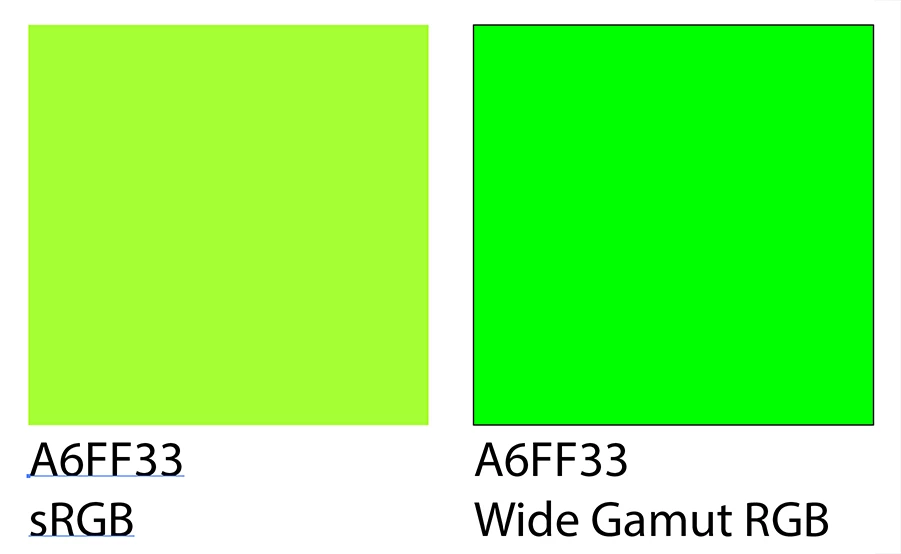
    Because a Hexcode does not mean a thing if you don't specify an RGB colorspace.

    And because a Hexcode is an RGB color and can be difficult to reproduce in CMYK.

    2 replies

    Srishti_Bali
    Legend
    October 5, 2017

    Hi HolmH,

    I would like to know if the steps suggested by Mike worked for you, or the issue still persists.

    Kindly update the discussion if you need further assistance with it.

    Thanks,

    Srishti

    HolmHAuthor
    Participant
    October 6, 2017

    Well,

    still exists this problem that Hexcode can't be fixed as a brand-color.

    Kind regards

    Holm

    Ton Frederiks
    Community Expert
    Ton FrederiksCommunity ExpertCorrect answer
    Community Expert
    October 6, 2017

    Because a Hexcode does not mean a thing if you don't specify an RGB colorspace.

    And because a Hexcode is an RGB color and can be difficult to reproduce in CMYK.

    Mike_Gondek10189183
    Community Expert
    Community Expert
    September 19, 2017

    If you are receiving your brand colors in hex, then you must make sure your file >> document color mode >> is set to RGB prior to entering those numbers, and then you can add to your library. Your rollover post it note shows your document color mode was in CMYK when entering hex,

    If you also need to work in print, then you will need to request the CMYK or spot color equivalents of those colors, and add those as separate entries in you library. Currently Librararies do not allow color groups as in color swatches. I highly suggest to use a naming convention such as adding "CMYK" to the end of you swatch color names.

    The library accepts elements in both color mode, but is your job to ensure  the correct ones are being used. You never want to use RGB elements in a CMYK document or visa versa.

    There is no RGB toCMYK equivalent numbers or visa versa. Even 255RGB does tho equal 0CMYK, they are 2 different color spaces.