Inspiring
March 4, 2024
Answered

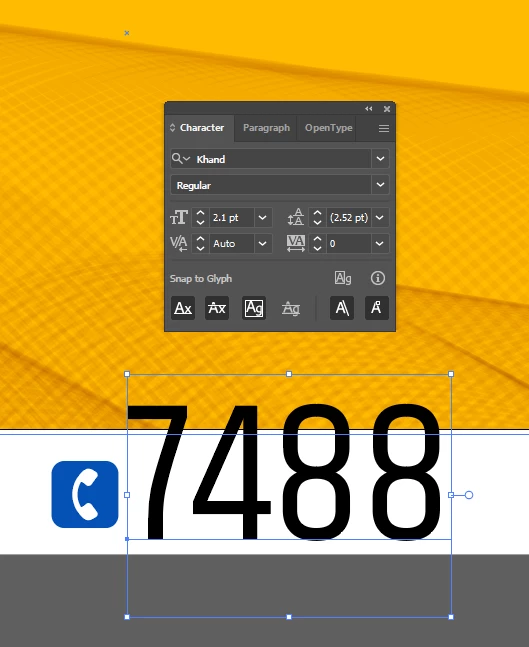
Hi guys! Why is the text bigger even though the font size is 2?
  • March 4, 2024
  • 2 replies
  • 243 views


This topic has been closed for replies.
Correct answer Monika Gause

Probably the file is very small. Check the artboard size.

2 replies

Jacob Bugge
Community Expert
Community Expert
March 4, 2024

hibru,


Based on a different interpretation, I am afraid the long answer is Em.


https://en.wikipedia.org/wiki/Em_(typography)


The old cheat is to:


1) Tick Use Preview/Artwork Bounds in Edit>Preferences>General;
2) Select the live Type with the (normal) Selection Tool and Effect>Path>Outline Object.


That will give you a Bounding Box that fits tightly round the actual set of characters in your live Type, and will ensure easy and accurate positioning, such as centring (both directions), and keeps doing so when you edit, without resorting to working (indirectly) with the Glyph (bounds) concept,

https://helpx.adobe.com/illustrator/using/snap-to-glyph.html


Ususally, you will need to make final adjustments to have the Type appear visually in the right way: what looks right is right.


If you need it as non outlined text in PDF you will have to remove the effect:

3) With the live Type selected, in the Appearance palette click the Reduce to Basic Appearance button.


That will bring it back to normal plain Type.


Obviously, you will need to untick Use Preview/Artwork Bounds for other purposes, but you can just tick that again when you need to edit (some of) the Type if needed to keep it in place; that may not be necessary because the changes will (mostly, and only if no letters exceed the hitherto vertical bounds) be in the horizontal direction.

Monika Gause
Community Expert
Community Expert
March 4, 2024

It doesn't matter whether it's em or the bounding box or anything else, but when my type size is 2 pt then I will run into a legibility issue. So I will need to check whether everything is set up correctly.

Monika Gause
Community Expert
Monika GauseCommunity ExpertCorrect answer
Community Expert
March 4, 2024

Probably the file is very small. Check the artboard size.
