
High Memory usage by Illustrator 2019 on MAC OS
Hello,
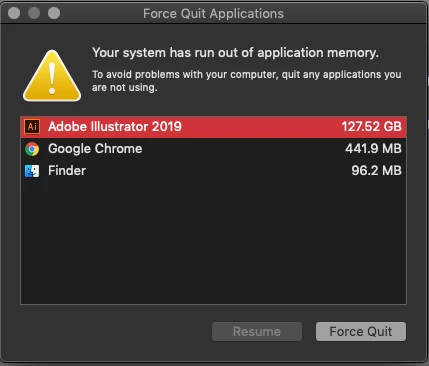
The attached error message has been popping up near the end of my work day more and more over the last two weeks. Since the solution in the support database is to stop running clipboard functions, and since I obviously am not, I am guessing this is being caused by something else.
I have the following system:
MacBook Pro (15-inch, 2017)
2.8 GHz Intel Core i7
16 GB 2133 MHz LPDDR3
Radeon Pro 560 4 GB
Intel HD Graphics 630 1536 MB
Running
Adobe Illustrator 23.0.4
What I have tried:
Restarting the computer (usually takes about 4 or 5 hours of work to trigger the error, then it just keeps coming back over and over again).
Uninstall/reinstall (Seems the same as restarting)
I know there are some files in the Users>Library that I can try to dump but if the unistaller wasn't able to handle them properly I don't know what manually trashing them would do.
This particular software crash has cost me some data and it is sucking up more time than I like.
Any assistance from the forum would be appreciated.
{Renamed by MOD}
 AdChoices