


Inspiring
March 22, 2022
Answered

High Memory Usage for All Adobe Apps on macOS

  • March 22, 2022
  • 2 replies
  • 20289 views

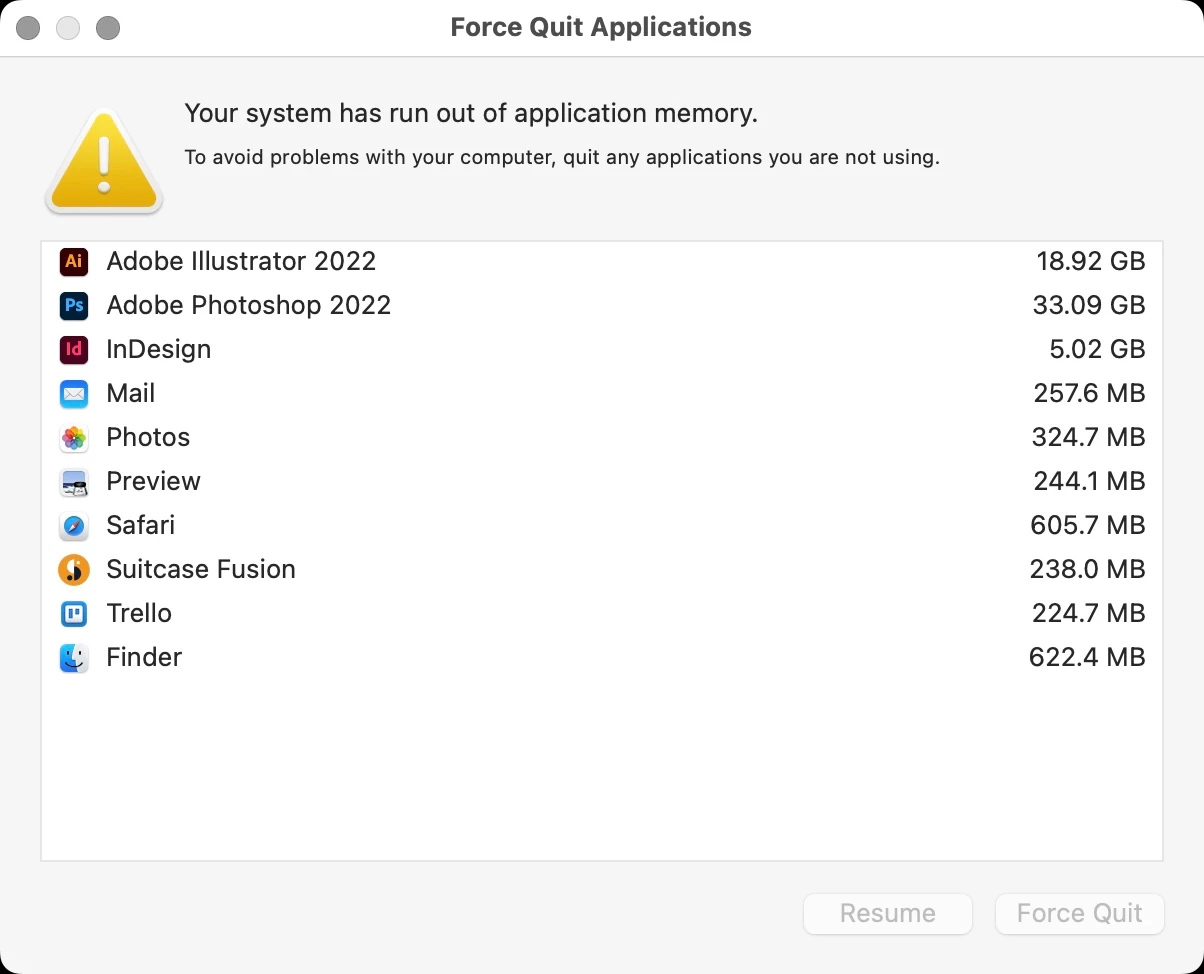
Reoccuring issue with Adobe apps using excessive memory. I'm getting pop-up warnings. For example, AI is open but no files open (18.92GB RAM), PS has 4 files open totaling less than 100MB file size using (33.09GB RAM). PS and ID are randomingly crashing without any crash report or pop-ups.


I've reopened PS, and still using 22GB with a couple small files open.


I really don't know where to go with this, but it's getting really frustrating.


On a side note: why is this forum forcing to select a topic with only choices unrelated.


MacBook Pro (16-inch, 2021),  Apple M1 Max, 64GB Memory.
Correct answer markfug

How much should ram should AI be using when it is just open but no files are open?


I've probably spent about 20 hours trying to resolve.

I've uninstalled both AI and PS and reinstalled. Both apps are now in a normal range of memory. I don't know what common attributes they had driving up their memory usage.

AI is now at 1.79GB and PS at 1.07GB. Now I need to go back and clean up after the tornado.

2 replies

New Participant
December 20, 2024

Same problem. Upgraded to an M4 pro max and I'm having the same issues 

Abhishek Rao
Community Manager
Community Manager
December 20, 2024

Hello @GretchenD,


Sorry to hear you're facing similar issues with high memory usage. To assist you better, could you please share the following details?

1. Exact version of macOS you're using on your M4 Pro Max.

2. Version of Illustrator and any other Adobe apps you’re experiencing the issue with.

3. Since when have you been encountering this problem? Did it start after a specific update or change?

4. Have you made any configuration changes within the application or system?

Additionally, could you confirm if you've already tried the troubleshooting steps mentioned in this thread, such as:

  • Running the Repair Disk Permissions tool.
  • Disabling startup apps and rebooting in Safe Mode.
  • Testing the apps on a new admin user account.
  • Performing a clean reinstall of the affected Adobe apps using the Adobe Cleaner Tool.

Let us know how it goes, and feel free to share screenshots or any observations for further insights. We're here to help!


Best,
Abhishek Rao

New Participant
December 20, 2024

Yes, it all started after upgrading to Sequoia.

I'm using 

Version 15.1

and all of my adobe apps are up todate. 

I also notice Chrome and Sawgrass printer software growing in size. 

Community Manager
March 22, 2022

Hello @markfug ,


Sorry to hear about the problem you are facing. In order to help you further we will need a few more details like:

  • Exact version of OS and the Adobe apps
  • When did you start facing this problem? Have there been any recent changes made to your system (Sofware Update / Plug-Ins / Antivirus)
  • Have you tried updating your Adobe apps to the latest version?


Problems like this are usually related to disk permissions issues. I would suggest you to try and Repair Disk Permissions for macOS and share your observations with us.

Looking forward to hearing from you.


Thanks,

Anubhav

Participating Frequently
March 22, 2022

Hi,

I have a similar problem with:

Macbook Pro 13 inch M1 2020, 16gb 1TB (300gb free)

Monterey 12.3

Illiustrator 26.1

As soon as I open Illustrator the Memory Pressure/RAM usage reaches near capacity. If I open even a small file I'm often getting a message saying I'm out of memory which is ridiculous. I spoke to Apple who say it's an Illustrator problem. I've attached screenshots of ram load with no files open.

Please advise asap.

Regards

Tony

Participating Frequently
March 22, 2022

I also followed your advice to run Repair Disk Permissions but it made no difference.