Answered
This topic has been closed for replies.
Alexandra, Hi.
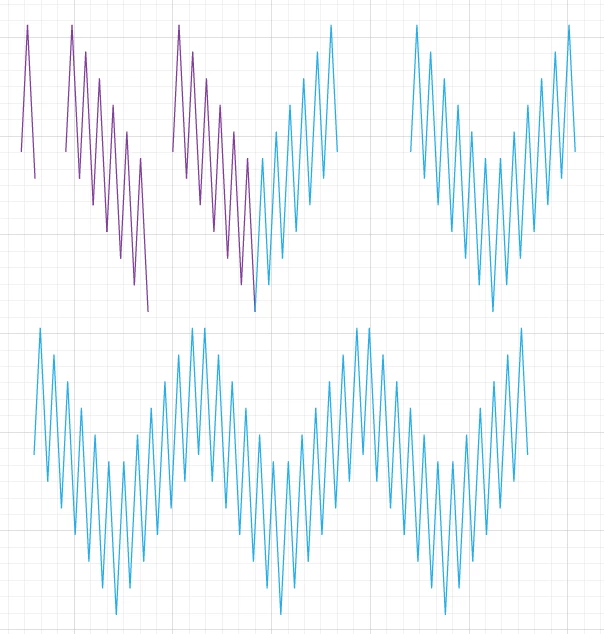
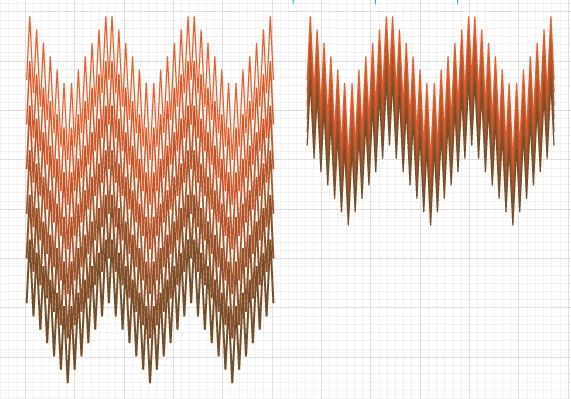
To recreate that Flame Stitch pattern, see image below. I random color as I work.
Pen Tool. Draw your shape.
Duplicate. Turn on Smart Guides and Snap to Point.
Manually Align, Path>Join. You now have one side.
Duplicate again, Flip, align, Join. Now you have both sides
Finally, Dup again, Align, Join.
Now you have one open path, seamless.
From there, play with Blend Steps.
Different colors, different stroke weights, different distances, etc.
K
Sign up
Already have an account? Login
To post, reply, or follow discussions, please sign in with your Adobe ID.
Sign inSign in to Adobe Community
To post, reply, or follow discussions, please sign in with your Adobe ID.
Sign inEnter your E-mail address. We'll send you an e-mail with instructions to reset your password.
 AdChoices