Participant
September 23, 2020
Answered

Hindi Digits in Illustrator 2020

  • September 23, 2020
  • 3 replies
  • 3902 views

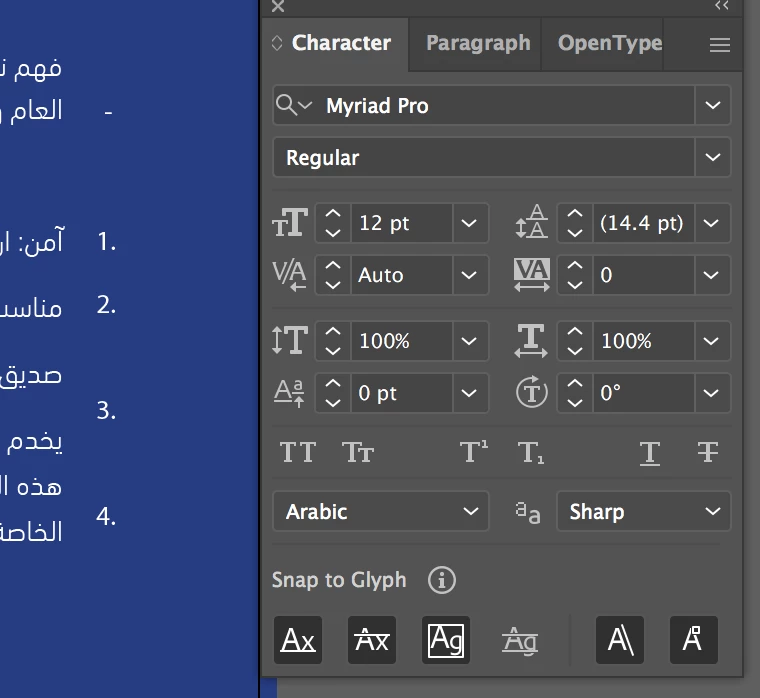
the 2019 version had a very obvious drop-down for it in the Character tab. But I can't find it anywhere in the 2020 version. I have numbers I want to switch to the Hindi (used in arabic) numbers.

This topic has been closed for replies.
Correct answer Zaid Al Hilali

I'm afraid that you don't have the Middle Eastern version any longer. It appears that when you updated your Illustrator to the latest version the wrong version was downloaded.

You basically need to remove your copy of Illustrator, change the language from Adobe CC desktop application, then download Illustrator again to get full Arabic features.

3 replies

Participant
January 17, 2021

Hello

I have the opposite problem - in the new version of illustrator updated - all my numerals are coming up in Arabic and I cant change them as I cannot see the "digits" option in the character panel - what can I do to see the digits option please to change it English numerlas?

Ashutosh_Mishra
Inspiring
September 24, 2020

Hi there,


Thanks for reaching out. In addition to Zaid's correct response, I'd request checking out this help article to know how to install MENA version.

Additionally, please see this help article to know how to type in Arabic.

Hope it helps.


Regards,

Ashutosh

Participant
December 3, 2020

HI Asutosh and Zaid Al Hilali,

{Currently am using Acrobat X pro}. I am interested in Working on mutiple .pdf files that are all in (Indian) Sanskrit/Hindi or Gujarati languages. You mentioned that 'to do a word search in these .pdf files, I cannot use Acrobat, but can be helped with Illustrator. Can an Enterprise license make me eligible for that download or i have to buy it separately?

pls. advice.

thnx.

-rajsan1

Zaid Al Hilali
Community Expert
Community Expert
December 5, 2020

Hi Rajsan,

You can search for words in Acrobat and the free Adobe Reader if the text in the PDF is live text, not an image or outline. There is no point in involving Illustrator to perform a word search.


Note. The above topic/post I answered is not related to the Hindi language, it is rather about these numbers ٠٩٨٧٦٥٤٣٢١ used in many Arab countries, these numbers are called Hindi digits/numbers since they were introduced by the Mogul invaders centuries ago. While these digits 1234567890 are called Arabic numbers as they were geometrically designed by an Arab scholar before the Hindi digits were introduced in the Arab world.

Zaid Al Hilali
Community Expert
Zaid Al HilaliCommunity ExpertCorrect answer
Community Expert
September 24, 2020

I'm afraid that you don't have the Middle Eastern version any longer. It appears that when you updated your Illustrator to the latest version the wrong version was downloaded.

You basically need to remove your copy of Illustrator, change the language from Adobe CC desktop application, then download Illustrator again to get full Arabic features.

Participant
September 24, 2020

thank you! it worked

Zaid Al Hilali
Community Expert
Community Expert
September 24, 2020

You're welcome.