December 13, 2025
Answered

How can I adjust the curvature of multiple joined lines, like adjusting a curved anchor point?

  • December 13, 2025
  • 2 replies
  • 276 views

I'm a beginner, and I don't know what keywords to use to search for this problem. LOL.

I need to make the highlighted parts of my object curved, which I tried to achieve by using the Blend tool to join multiple lines of width to make the shape I wanted (inspo attached), but it made the shape jagged. What can I do? TYIA!

What I need help on.Inspo.

Correct answer Ton Frederiks

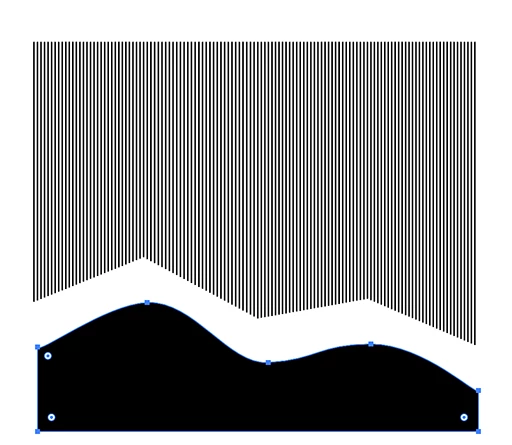
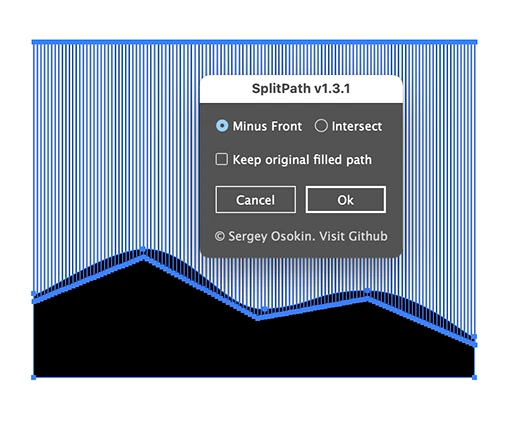
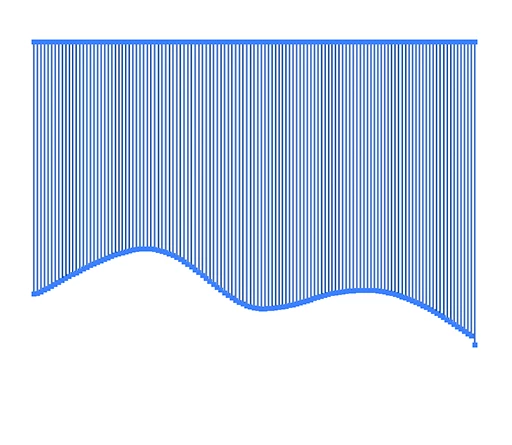
You could draw a shape in front of the lines, select both and use a script (SplitPath.jsx) by Sergey Osokin:

https://github.com/creold/illustrator-scripts/blob/master/md/Path.md#splitpath

01 Screenshot 2025-12-13 at 22.59.48.png02 Screenshot 2025-12-13 at 23.00.32.png03 Screenshot 2025-12-13 at 23.00.41.png

2 replies

Kurt Gold
Community Expert
Community Expert
December 13, 2025

As a beginner you may also explore the capabilities of clipping masks, compound clipping masks, the Shape Builder tool, Live Paint, Pathfinder, the Shaper tool and sometimes even the Eraser tool.

Ton Frederiks
Community Expert
Ton FrederiksCommunity ExpertCorrect answer
Community Expert
December 13, 2025

You could draw a shape in front of the lines, select both and use a script (SplitPath.jsx) by Sergey Osokin:

https://github.com/creold/illustrator-scripts/blob/master/md/Path.md#splitpath

01 Screenshot 2025-12-13 at 22.59.48.png02 Screenshot 2025-12-13 at 23.00.32.png03 Screenshot 2025-12-13 at 23.00.41.png

Ton Frederiks
Community Expert
Community Expert
December 13, 2025

See here the description how to use the script

https://github.com/creold/illustrator-scripts