
Inspiring
January 17, 2023
Answered

How can I auto export all Arboards in the document as PNG using javascript?

  • January 17, 2023
  • 1 reply
  • 465 views

Hi, I have a script that exports the current AI document as PNG24 and it works just fine but recently we changed the AI file to a new one, but now the new file is seperated by artboards and i whant the script to export all of the artboards seperarated but it exports just all artboards in just one PNG file.

I saw this post: https://gist.github.com/larrybotha/5baf6a9aea8da574cbbe that works just fine and does the work if i whanted to doit by hand file by file, but it creates a window to input the export options ant it have just to many options to input. The window that the script creates:
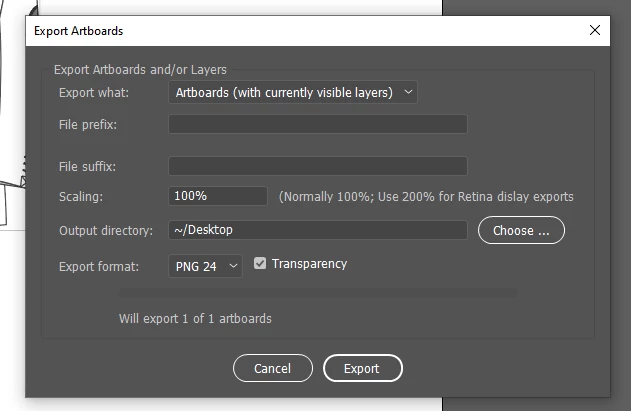
 

My question is is there so way to do the script but automaticly whith default otions preseted inside the code, where i dont have to input all the export options every time that the script will export the artboards?


The code that im currently using:

doc = app.activeDocument;
doc.activate();
//Export PNG
doc.exportFile(
    new File(destination_folder + '/' + textFile.name.split('.')[0] + '.png'),
    ExportType.PNG24,
    new ExportOptionsPNG24()
);


This topic has been closed for replies.
Correct answer joelmtm

Hello,

I was able to use your code, and it apend to work realy fine, i apreciate your time and your help, whith that i was able to put my mind on the right way to do the final code.

I also did a deep read in the Matthew Ericson's article thet i post before and i ended up with this code:

            var docRef = app.activeDocument;
                
            options = new ExportOptionsPNG24();
            options.antiAliasing = true;
            options.transparency = true; 
            options.artBoardClipping = true;
            options.horizontalScale = 200.0;
            options.verticalScale = 200.0;

            var starting_artboard = 0;
	        var num_artboards =  docRef.artboards.length;
            for (var i = starting_artboard; i < num_artboards; i++ ) {
                
                var artboardName = docRef.artboards[i].name;
                starting_artboard = docRef.artboards.setActiveArtboardIndex(i);

                var base_filename = Folder(destination_folder) + "/" + textFile.name.split('.')[0] + "-" + i
             
                var destFile = new File( base_filename + '.png' );   
                var export_type = ExportType.PNG24;
                docRef.exportFile(destFile, export_type , options);
            }

This works for mi, as i said before it works with preset values on the code, that way i only need to doit one single time.
Thanks again for your help 🙂

1 reply

Charu Rajput
Community Expert
Community Expert
January 17, 2023

Hi,

I have not modified or looks into the existing script.  Just wrote a simple version of the artboard export as PNG


var itemToExport = new ExportForScreensItemToExport();
itemToExport.artboards = '1-3'; //Sepecify the range of the arboards that you want to export
itemToExport.document = false;
var _exportFolder = File(Folder.desktop);

//specify options for PNG settings
var options = new ExportForScreensOptionsPNG24();

app.activeDocument.exportForScreens(_exportFolder, ExportForScreensType.SE_PNG24, options, itemToExport);


Above script will require more handling for errors for the case when user sepcify artboards as 1-3 but there are only 2 artboards in the document.


Best regards
joelmtmAuthorCorrect answer
Inspiring
January 18, 2023

Hello,

I was able to use your code, and it apend to work realy fine, i apreciate your time and your help, whith that i was able to put my mind on the right way to do the final code.

I also did a deep read in the Matthew Ericson's article thet i post before and i ended up with this code:

            var docRef = app.activeDocument;
                
            options = new ExportOptionsPNG24();
            options.antiAliasing = true;
            options.transparency = true; 
            options.artBoardClipping = true;
            options.horizontalScale = 200.0;
            options.verticalScale = 200.0;

            var starting_artboard = 0;
	        var num_artboards =  docRef.artboards.length;
            for (var i = starting_artboard; i < num_artboards; i++ ) {
                
                var artboardName = docRef.artboards[i].name;
                starting_artboard = docRef.artboards.setActiveArtboardIndex(i);

                var base_filename = Folder(destination_folder) + "/" + textFile.name.split('.')[0] + "-" + i
             
                var destFile = new File( base_filename + '.png' );   
                var export_type = ExportType.PNG24;
                docRef.exportFile(destFile, export_type , options);
            }

This works for mi, as i said before it works with preset values on the code, that way i only need to doit one single time.
Thanks again for your help 🙂